
Hi, It can be a very simple question but I am not sure why the Smart List is not working properly. | Community
Skip to main content
Vidhi_Kare
New Participant
October 18, 2019
Solved

Hi, It can be a very simple question but I am not sure why the Smart List is not working properly.

  • October 18, 2019
  • 2 replies
  • 3835 views

Hi

I have added a few filters in Smart list to find any member leads or members who do not have the correct preferences URL.  This should return zero results. But, it is giving me results.
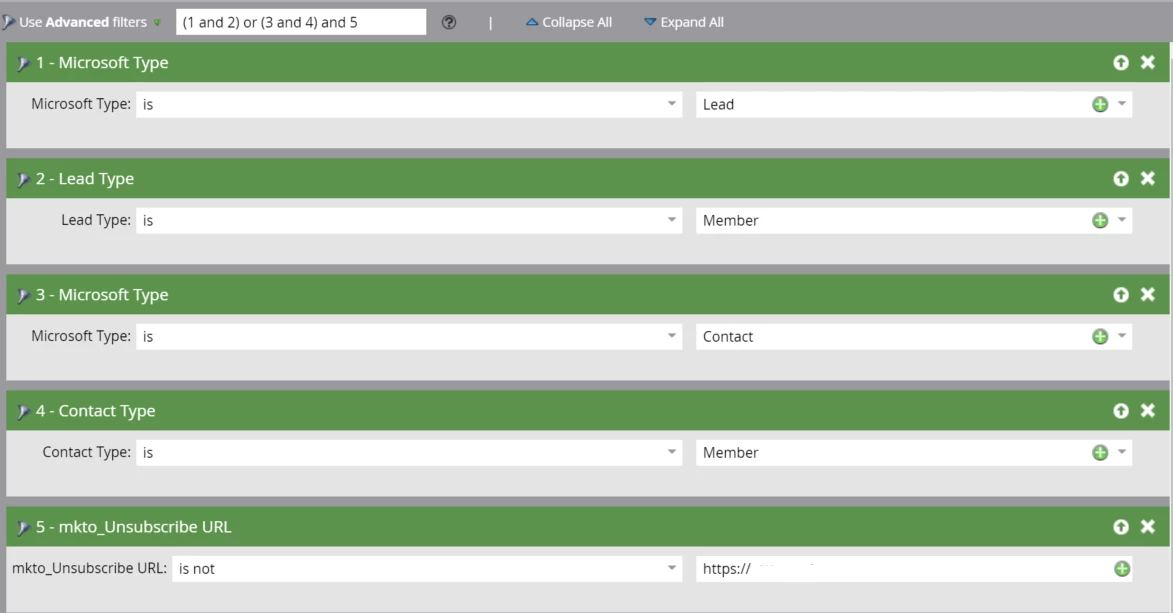
I just wanted to know if something is wrong with the smart list filters. Any help would be appreciated.

Kind Regards

This post is no longer active and is closed to new replies. Need help? Start a new post to ask your question.
Best answer by karanhari-1

 Hi @Vidhi Kare ,

Glad to know your issue was fixed. Please let us know in case of any other questions.

Also, incase you consider your query resolved, request you to please mark whichever response that answered your question as "Correct" so that this thread reflects as answered in the community & would aid in future searches!

Best Always,

Karan Hari

2 replies

Selventhiran_Ra-2
New Participant
October 18, 2019

Please try with Advanced Filter Logic (((1 and 2) or (3 and 4)) and 5)

and also on the filter 5, Please give the complete URL without https. 

I hope it will work out!

Thanks!

Selventhiran R
Vidhi_Kare
New Participant
October 18, 2019

Hi,

Thanks for your quick suggestions.

Yes, when i changed the parenthesis in Advanced Filter Logic to  (((1 and 2) or (3 and 4)) and 5). And removed https and changed to "Not Contains" instead of Is not as suggested by Karan Hari as above, it is working fine.

The results are as expected now.


Kind Regards!

karanhari-1Accepted solution
New Participant
October 18, 2019

 Hi @Vidhi Kare ,

Glad to know your issue was fixed. Please let us know in case of any other questions.

Also, incase you consider your query resolved, request you to please mark whichever response that answered your question as "Correct" so that this thread reflects as answered in the community & would aid in future searches!

Best Always,

Karan Hari

New Participant
October 18, 2019

Hi @Vidhi Kare ,

In your smart list, are you defining your incorrect URL as -  https:// 

Also I see that you have used "IS NOT" in the below filter.When you use "Is or Is not", Its best to specify the URL.  In this case can you try either specifying the incorrect URL or use "Not Contains" and see if that makes a difference?

 Id also recommend enclosing the leads and contacts with double brackets and separating them from the last criteria - as given below.

Can you try these changes and see if that made a difference?

Best Always,

Karan Hari