Hide Starter Templates in Email Editor Template Picker | Community
Skip to main content
Jesse_Richard
New Participant
April 4, 2018
Solved

Hide Starter Templates in Email Editor Template Picker

  • April 4, 2018
  • 1 reply
  • 3048 views

I'd like to hide the "Starter Templates" that are offered when a person creates an email, and only show "My Templates" - is this possible?

This post is no longer active and is closed to new replies. Need help? Start a new post to ask your question.
Best answer by Jenna_Molby10

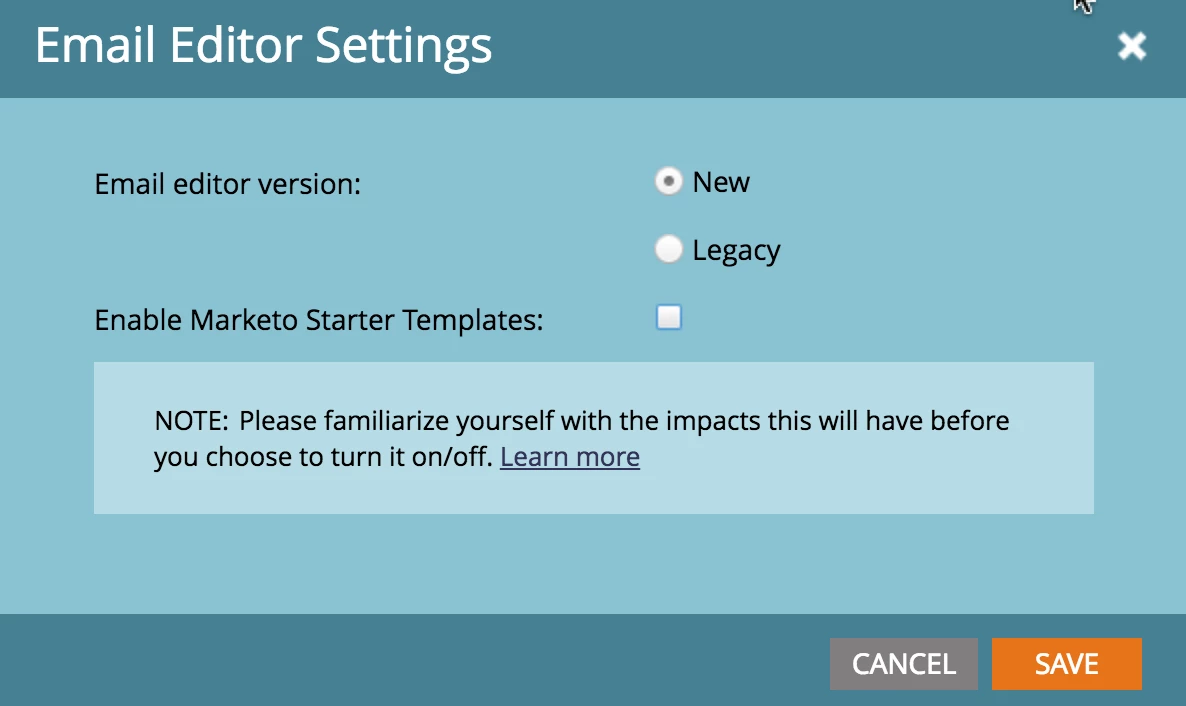
Yes, it's possible. Go to Admin > Email > Edit Email Editor Settings and uncheck Enable Marketo Starter Templates.

1 reply

Jenna_Molby10
Jenna_Molby10Accepted solution
New Participant
April 4, 2018

Yes, it's possible. Go to Admin > Email > Edit Email Editor Settings and uncheck Enable Marketo Starter Templates.

Grégoire_Miche2
New Participant
April 6, 2018

Would be much better if this was a role, rather than a global on-off.

votre here:

-Greg