Hiding the Submit Button based on the Drop Down Selection | Community
Skip to main content
New Participant
September 19, 2022
Solved

Hiding the Submit Button based on the Drop Down Selection

  • September 19, 2022
  • 1 reply
  • 5931 views

Hello there,


I am looking to hide my submit button from my Form if specific selections are made within the drop down of the form. How can I make this work? Please direct me to the correct path as this is my first time trying to execute such a thing. 
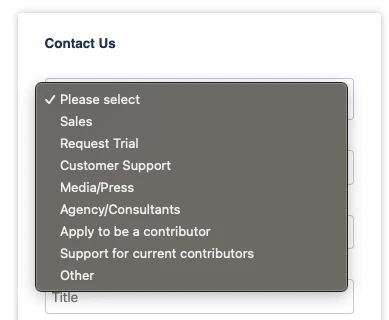
In this form, if a person selects Agency/Consultants, Apply to be a contributor or Support for current contributors the form Submit button should disappear while a message pops up. I was able to hide the rest of the fields and get the message appear using the visibility rules. But I am not sure how to make the Submit button disappear once either of those selections are made. 

Thank You!

Best answer by SanfordWhiteman

Can Someone please help me with this?


I want the Submit button disappeared when someone choose Agency/Consultants in this website.


https://info.usertesting.com/WEB-Contact-Us-Form_Testing-Form-Submit-Button.html


I created an updated JS snippet with fewer dependencies:

MktoForms2 :: Conditionally Show Submit v2.0.0


Usage should be self-explanatory: just populate submitButtonVRs with your rules. I also put up a blog post about it:

Conditionally show/disable/hide the Submit button on Marketo forms

1 reply

SanfordWhiteman
New Participant
September 19, 2022
Have you searched old posts? I'm certain I answered this at least once once in the past. If you can't find it I can link to the code again.
freezaAuthor
New Participant
September 19, 2022

I have looked at old posts. But I am not sure exactly where in Marketo form I am supposed to add the JS code into. I know the CSS code goes inside the Marketo Form Setting. But I don’t know where exactly the other codes location should be. When I tried putting the CSS code from your solution to my Form it started repeating the form so many times.

SanfordWhiteman
New Participant
September 20, 2022
Can you link to the post you're referring to please?