How can I float multiple fieldsets in a form hosted on a Marketo landing page | Community
Skip to main content
New Participant
March 22, 2017
Solved

How can I float multiple fieldsets in a form hosted on a Marketo landing page

  • March 22, 2017
  • 1 reply
  • 4393 views

I need to set up several multi-column forms and figured the easiest way to accomplish this is through utilizing fieldsets, however I'm having difficulty getting my forms to go from this:
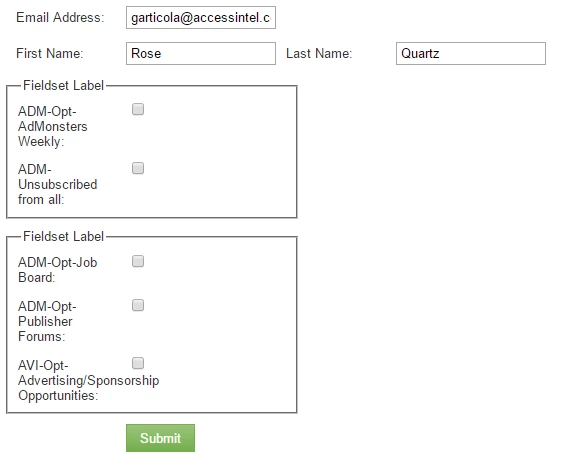
To this:
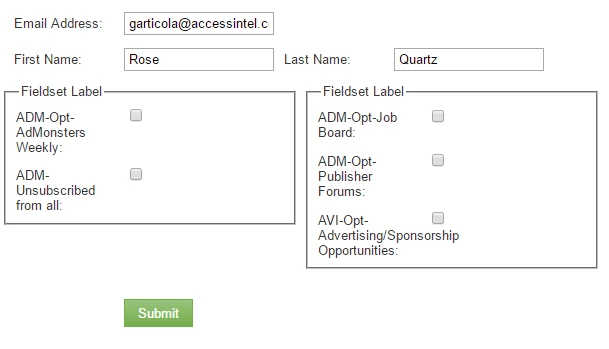
While still keeping the form hosted on a Marketo landing page. What CSS do I need to override to get the fieldsets to float horizontally on this page? lp.accessintel.com/testtest.html

Thank you in advance for any help!

This post is no longer active and is closed to new replies. Need help? Start a new post to ask your question.
Best answer by SanfordWhiteman

Make sure the form is wide enough for both columns (it isn't now) and then:

.mktoFormRow:nth-of-type(3),

.mktoFormRow:nth-of-type(4) {

    float: left;

}

.mktoFormRow:nth-of-type(4) {

    clear: none;

    margin-left: 20px;

}

Though this is quite fragile as it applies to the particular row order on this form. If I were building this out I'd do much more labeling.

1 reply

SanfordWhiteman
SanfordWhitemanAccepted solution
New Participant
March 22, 2017

Make sure the form is wide enough for both columns (it isn't now) and then:

.mktoFormRow:nth-of-type(3),

.mktoFormRow:nth-of-type(4) {

    float: left;

}

.mktoFormRow:nth-of-type(4) {

    clear: none;

    margin-left: 20px;

}

Though this is quite fragile as it applies to the particular row order on this form. If I were building this out I'd do much more labeling.

New Participant
March 22, 2017

This is perfect, thanks Sanford!

If you were building this out, what would you recommend to achieve the same result? I'm open to your Marketo form suggestions!

SanfordWhiteman
New Participant
March 22, 2017

I typically label my form rows (using JavaScript) so I don't have to worry about fields/fieldsets being added/deleted/reordered later and breaking the layout. Especially because field reordering itself may be the special behavior I'm adding.