How can I modify Lead Activity in SFDC? | Community
Skip to main content
March 4, 2014
Solved

How can I modify Lead Activity in SFDC?

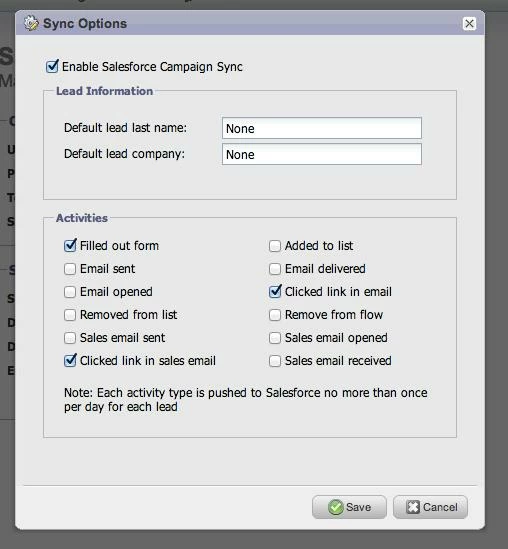
I want to minimize the lead and contact activity in SFDC to "sent email and opened email".  I want to eliminate delivered email, etc. from the activities because it's filling up the lead view and is really hard to get through.  I can't remember how to change this - anyone know how?
This post is no longer active and is closed to new replies. Need help? Start a new post to ask your question.
Accepted solution
March 4, 2014

Hi Monica,

You'll need to go into your Admin tab, click on Salesforce under the Integrations section in the left-hand column and un-checkmark "Email delivered."


2 replies

March 5, 2014
Thank you so much, Safia.  I forgot where this was! 
Translate
Accepted solution
March 4, 2014

Hi Monica,

You'll need to go into your Admin tab, click on Salesforce under the Integrations section in the left-hand column and un-checkmark "Email delivered."


Translate