How can you line the check box up to be next to your copy? | Community
Skip to main content
October 14, 2014
Solved

How can you line the check box up to be next to your copy?

In a form, I would like someone to be able to select multiple answers by checking boxes. When I add them to the form, the checkbox is below the copy. Is there a way to line them up?

Thank you,
Mandy
This post is no longer active and is closed to new replies. Need help? Start a new post to ask your question.
Dory_Viscoglio
Dory_ViscoglioAccepted solution
Level 10
October 14, 2014
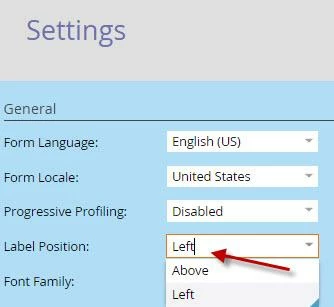
Hi Mandy, in the settings of the form, do you have the label position as Left, or Above?


4 replies

October 14, 2014
Thank you!! It worked :) 
Translate
Dory_Viscoglio
Dory_ViscoglioAccepted solution
Level 10
October 14, 2014
Hi Mandy, in the settings of the form, do you have the label position as Left, or Above?


Translate
October 14, 2014
 No, it is placing the checkbox under the copy field. I want to pull the box up next to the copy...see below for the way it looks in the form and also on my landing page. 

 
Translate
Kenny_Elkington
Level 10
October 14, 2014
Hey Mandy,

You can drag and drop all fields in a Marketo form.  Is this not working for you?
Translate