How Do Communication Limits Work? | Community
Skip to main content
October 9, 2015

How Do Communication Limits Work?

  • October 9, 2015
  • 17 replies
  • 25833 views

Recently, I had to remind one of my clients about the ability to set communication limits in Marketo. We were brainstorming new email and nurture campaigns, and she was concerned about over-communication with leads who qualify for multiple campaigns.

So she asked: “How do communication limits work?"

There’s some information about this on the community, but it took me some digging around so I’m collecting all that info here for others who might also be curious.

The simple answer is: Marketo allows you to set the maximum number of emails a lead will receive per day or per week.

A more detailed answer follows in the form of FAQS:

  1. How is “per day” and “per week” defined? The per day limit is based on a calendar day from 12 am to 12 am. The per week limit is on a rolling basis from 12 am to 12 am between. (Time zones are defined in your Admin - Location panel).

  1. How do you turn on communication limits? You can enable and define communication limits globally in the Admin tab.

  2. Can you override communication limits? You can override global communication limits at an email program level or smart campaign level.

  1. What happens if a lead has reached their communication limits? These are the scenarios:

  • For plain ole’ scheduled or triggered marketing emails: The lead will NOT receive the email.
  • For operational emails: The lead will still receive the email.
  • For engagement programs: The lead will receive the email in the NEXT cast.
  • For sales insight emails (sent through our Salesforce or MS Dynamics app, not through the Sales Insight email plug-ins for Outlook or Gmail): The lead will receive the email if the email includes an unsubscribe footer. If not, the lead will NOT receive the email.
  • For alerts: The lead - more likely, an internal user - will receive the alert.

  1. What emails count towards communication limits?

Almost all emails, even operational emails are counted against communication limits. Here’s an idea in the community to exclude operational emails from communication limits. A couple notable exceptions:

  • Any sales insight emails without the unsubscribe footer and alerts, or those sent through the Sales Insight email plug-ins for Outlook or Gmail.
  • Marketo Mobile Engagement push notifications are not counted in communications limits, and you are not able to apply these limits to push notifications.

  1. What’s the best way to make sure leads who’ve reached their communication limits get the email later? As mentioned above, you can override the communication limits for this one email program or campaign. But if you want to respect your communication limits, I found some great tips on the community for this, such as:

  • The absolute best way to ensure leads who've reached their communication limits get an email later is to send emails through an engagement program. If leads reach their communication limits, they’ll simply receive the email in the next cast.
  • If you aren’t using an engagement program, do the manual thing: run a smart list for “not was sent email” and resend after the fact. Some of these leads could have been blocked for other reasons of course.
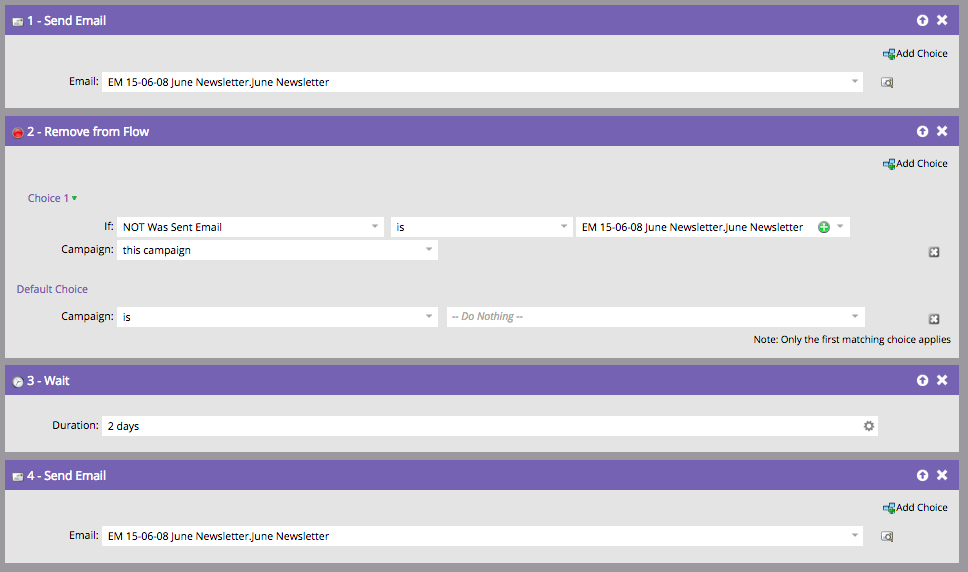
  • Or similarly, automate this process in your emails by including in your campaign after the “send email” flow: “remove from flow” if “was sent email," “wait X hours/days,” then “send email” again.
Thanks to Kristen Carmean, Cecily Gardner, and@Kenneth Elkington for their contributions to this post.

Did I miss any other scenarios? Let me know in the comments, and I’ll update this post.

    This post is no longer active and is closed to new replies. Need help? Start a new post to ask your question.

    17 replies

    sfoster-3
    New Participant
    October 13, 2021

    Question - should the "Remove from Flow" step be "If WAS sent email->This campaign"
    Then those that were not would continue down the flow, hit the wait step, and then get the resend.

    Kimberly_Galit1
    New Participant
    May 20, 2020

    See the 2020 Update!


    Since this is an old post, and @amy_goldfine wrote up a new post I wanted to get this out there for people to reference!


    Carly_Stevens
    New Participant
    March 12, 2019

    I have a question regarding communication limits and this point specifically 'For engagement programs: The lead will receive the email in the NEXT cast... What happens if we are using programs inside of our streams, and smart campaigns to trigger them? As opposed to just adding the email? Does this work differently regarding communications limits?

    Loc_Dao
    New Participant
    December 20, 2018

    I would love to know if this is possible as well.

    Sant_Singh_Rath
    New Participant
    July 27, 2018

    Thank you for sharing this with us. Although I haven't seen this but is there any way we can set the communication limit using segmentation?

    Best regards,Sant Singh Rathaur
    Victor_Herrero
    New Participant
    July 26, 2018

    Hi!

    Thanks for the effort of gathering information surrounding communication limits here.

    There are scenarios that I think have not been covered. Here they are:

    Scenario 1

    There are 3 engagement streams (A, B, C) and they go out on Monday, Wednesday and Friday. Communication limits are set to 2 emails a week.

    The lead qualifies for all three. The lead receives the Monday email (A) and the Wednesday email (B) and the Friday email gets blocked and gets queued.

    Will the lead never receive any emails from stream 3? Will the lead receive them only once it has been through A and / or B ?

    Scenario 2

    There are 3 engagement streams (A, B, C) and they go out on Monday, Wednesday and Friday. Communication limits are set to 2 emails a week.

    Let's say the lead qualifies for A and C. During the first two weeks receives Monday and Friday normally.

    Let's say on the third week it qualifies for B as well and gets added. What will happen on week three and on?

    Will the lead stop receiving stream C until either A or B are finished?

    Perhaps being able to prioritize streams (aside from sending on different days or at different times, since there are best times for casts and we would like to send during these windows) would be a nice feature. The only solution I can think of could be to change the "Add to engagement stream" so that it doesn't add leads if they are already in 2 streams or in specified streams.

    another way to prioritize would be to automatically remove leads from streams if they get added to the priority streams. The problem here would be re adding them afterwards to the correct ones perhaps.

    Any insights or advice regarding the scenarios above?

    Thanks in advance!

    Victor

    Dan_Stevens_
    New Participant
    February 20, 2018

    In Marketo, you have "workspaces" and "people partitions" (formerly known as "lead partitions").  Workspaces are configured to have access to one or more people partitions.  Comms limits work at the person/lead level, not based on workspaces or partitions.

    February 20, 2018

    How do the communications limits work with workspaces and partitions? For example,  say you have a workspace partition? would the limit still apply? 

    Dan_Stevens_
    New Participant
    March 17, 2017

    It looks at SENDS (not delivered).

    March 17, 2017

    Hi everyone, quick question - which email status count towards communication limits, email SENT or email DELIVERED?

    My dilemma is that there are many soft bounces in one email program and we would like to re-send to those people, although we clearly already exceeded 1 email per week limit. Does anyone know the answer?

    Thanks in advance!