How do I change web status at the program level? | Community
Skip to main content
March 11, 2016
Solved

How do I change web status at the program level?

  • March 11, 2016
  • 2 replies
  • 1383 views

We imported a list from ReadyTalk and during the importation process it made us select only one value, i.e. attended, no show etc., except that this list had people that obviously fit into more than one category. Now when I try and manually change a person's status it reverts back to attended. Would love some help to get this sorted out, cheers!

This post is no longer active and is closed to new replies. Need help? Start a new post to ask your question.
Best answer by Dan_Stevens_

Tyler - first of all, you should post product-related questions like this in the Products (Discussions) area of the community.  You'll get greater visibility.

When working with program statuses, it's important to note the step value next to each status.  That value indicates the sequence a lead must take to progress to program success. A lead cannot go backwards, only forwards or laterally.  We, too, assign multiple program statuses - especially when uploading a list of attendees from an event, when the event registration process wasn't done in Marketo.  When we get that list of attendees, we initially upload them as "registered".  Then we select all (in the Members tab) and change their program status to "attended".  Sometimes there are additional statuses that we wish to capture, but you get the idea.

When looking at the members of the event program, it will only display the current program status for each lead.  So in this case, you'll only see "attended" (even though they also once had a status of "registered").  Defining program statuses properly is one of the most important steps you should take before executing any activity out of Marketo.  It's the basis for how your leads progress through your lead lifecycle and on to sales readiness.  Here are the program statuses that we use for the live event channel:
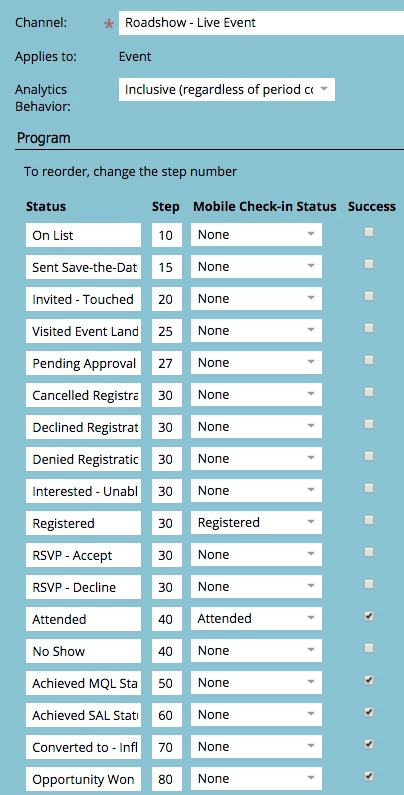
In your case, you probably needed to break up your list into multiple sub-lists.  Especially if you're working with statuses like "no-show"

2 replies

March 11, 2016

Tyler Matheny

Yep. Dan is right about Products​ so I moved your post and his answer. No big deal. Just letting you know. Thanks @Dan Stevens​

Dan_Stevens_
Dan_Stevens_Accepted solution
New Participant
March 11, 2016

Tyler - first of all, you should post product-related questions like this in the Products (Discussions) area of the community.  You'll get greater visibility.

When working with program statuses, it's important to note the step value next to each status.  That value indicates the sequence a lead must take to progress to program success. A lead cannot go backwards, only forwards or laterally.  We, too, assign multiple program statuses - especially when uploading a list of attendees from an event, when the event registration process wasn't done in Marketo.  When we get that list of attendees, we initially upload them as "registered".  Then we select all (in the Members tab) and change their program status to "attended".  Sometimes there are additional statuses that we wish to capture, but you get the idea.

When looking at the members of the event program, it will only display the current program status for each lead.  So in this case, you'll only see "attended" (even though they also once had a status of "registered").  Defining program statuses properly is one of the most important steps you should take before executing any activity out of Marketo.  It's the basis for how your leads progress through your lead lifecycle and on to sales readiness.  Here are the program statuses that we use for the live event channel:

In your case, you probably needed to break up your list into multiple sub-lists.  Especially if you're working with statuses like "no-show"