How do I make forms 2.0 submit button responsive like form fields? | Community
Skip to main content
January 12, 2015
Solved

How do I make forms 2.0 submit button responsive like form fields?

  • January 12, 2015
  • 3 replies
  • 3666 views
Forms 2.0 form fields are totally responsive, but the submit button does not seem to be. Our button has to be styled to align with the form fields, and looks correct on desktop (seen below):

On desktop:
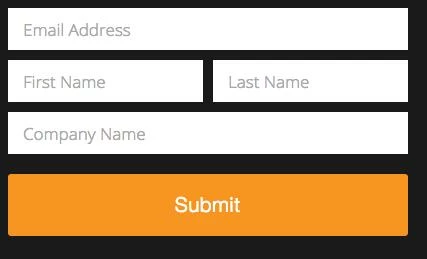

But on mobile, the form fields respond and the submit button gets cut off:
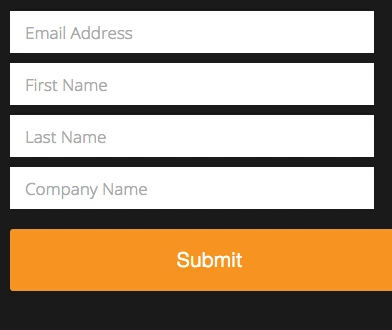

I'm assuming this is dealing with media queries, and was wondering if anyone has found a solution making the button respond with the form fields.

Thank you!!


This post is no longer active and is closed to new replies. Need help? Start a new post to ask your question.
Best answer by
Hi Devan,

You assume correctly. The media query (<= 480px) is applying style rules for the fields.

It looks like some custom styles are being used for the button, but there is no change to the button width at the 480px breakpoint.

Luckily, it looks like the button's alignment is already correct, so you just need to copy the width of the fields (which is 100%).

The following media query and CSS rule should be what you need; I almost always use it with Marketo forms. Adding this to the page's CSS should do the trick.

@media only screen and (max-width: 480px) {
    .mktoForm .mktoButtonWrap.mktoSimple .mktoButton {
        width: 100%;
    }
}

Let me know if this makes sense! Sorry for the code drop; I figured I might as well just hand it over.

Best,
Kyle

3 replies

January 12, 2015
Ah, yes! Thanks Kyle! 

I added the CSS you gave and the only other thing I had to do was add a max-width to the .mktoButtonWrap so it lined up perfect with the form fields.

.mktoButtonWrap {
  width: 100% !important;
  max-width: 400px !important;
}

Thanks again for the help!


January 6, 2016

added the code and still get the same problem with the submit button falling off screen...any help would be great

SanfordWhiteman
New Participant
January 7, 2016

Can you post a link to your actual LP w/form?

Accepted solution
January 12, 2015
Hi Devan,

You assume correctly. The media query (<= 480px) is applying style rules for the fields.

It looks like some custom styles are being used for the button, but there is no change to the button width at the 480px breakpoint.

Luckily, it looks like the button's alignment is already correct, so you just need to copy the width of the fields (which is 100%).

The following media query and CSS rule should be what you need; I almost always use it with Marketo forms. Adding this to the page's CSS should do the trick.

@media only screen and (max-width: 480px) {
    .mktoForm .mktoButtonWrap.mktoSimple .mktoButton {
        width: 100%;
    }
}

Let me know if this makes sense! Sorry for the code drop; I figured I might as well just hand it over.

Best,
Kyle
Edward_Masson
New Participant
January 12, 2015
I know its an issue.
I've just had to make sure on the form edit page that it's aligned to the left and just use JQuery on the page to set it better.