How do I use one form on multiple landing pages that drive to different thank you pages | Community
Skip to main content
New Participant
October 30, 2020
Solved

How do I use one form on multiple landing pages that drive to different thank you pages

  • October 30, 2020
  • 1 reply
  • 3152 views

Hi,

If I create one form in design studio to use on multiple pages each for different actions (content offer, trial offer, etc), how does the form fill on page X direct the user to 'thank you page X' vs page Y (with the same form) directing the user to 'thank you page Y'?


Thanks!
This post is no longer active and is closed to new replies. Need help? Start a new post to ask your question.
Best answer by SanfordWhiteman

You have to set a Hidden field to the current URL.

Add this code to the page (if a Marketo LP, put it just before the closing </body>, otherwise just put it right after the form embed):


MktoForms2.whenReady(function(mktoForm){ mktoForm.setValues({ lastMarketoFormURL : document.location.href }); });


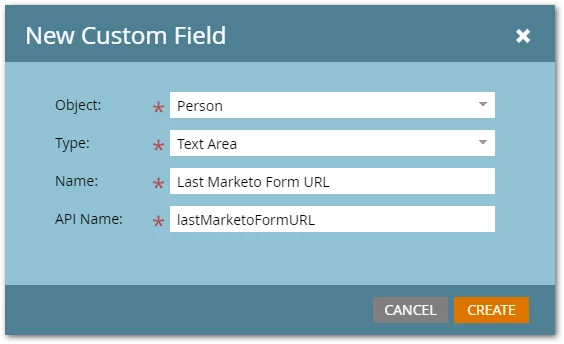
Create the field in Field Management:


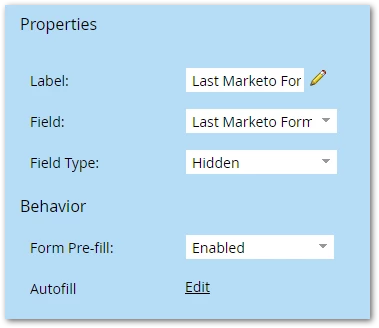
Add it to the form in Form Editor:


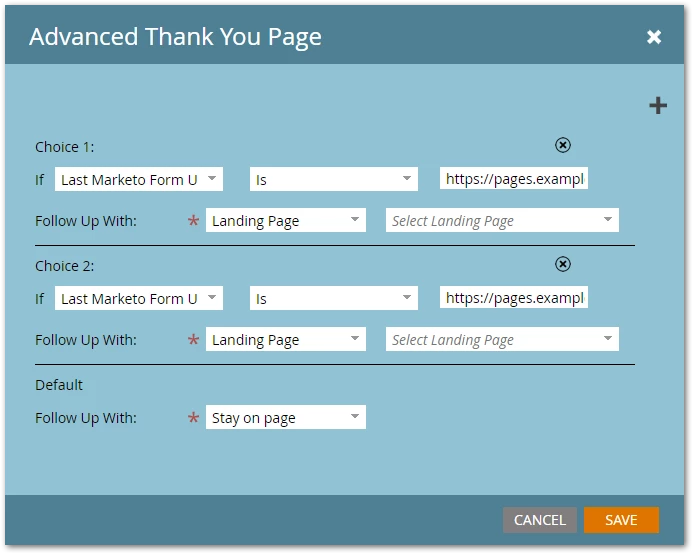
Then you can use Add Choice in Form Editor to select an Advanced Thank You.


1 reply

SanfordWhiteman
SanfordWhitemanAccepted solution
New Participant
October 30, 2020

You have to set a Hidden field to the current URL.

Add this code to the page (if a Marketo LP, put it just before the closing </body>, otherwise just put it right after the form embed):


MktoForms2.whenReady(function(mktoForm){ mktoForm.setValues({ lastMarketoFormURL : document.location.href }); });


Create the field in Field Management:


Add it to the form in Form Editor:


Then you can use Add Choice in Form Editor to select an Advanced Thank You.


kazarAuthor
New Participant
November 1, 2020

Thank you!