How does Block Field Updates work? | Community
Skip to main content
April 18, 2018
Solved

How does Block Field Updates work?

  • April 18, 2018
  • 2 replies
  • 7365 views

Hello,

I'm trying to block field updates to the Original Source field, as you can see below:
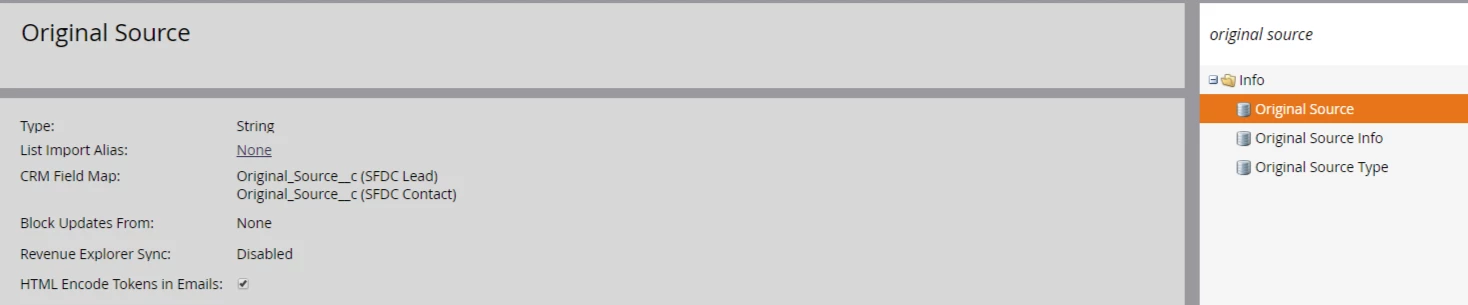
The idea is to let this field get populated once and then never get populated again. Ideally a sales rep will select a value for this in SFDC and it will sync to Marketo and get locked in.

I looked at the options to block updates and find them confusing. I don't know which one to select.
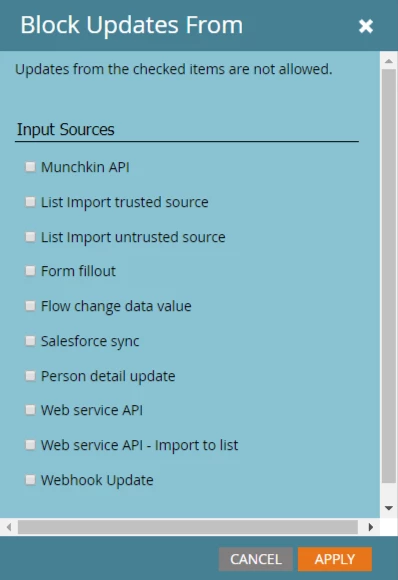
Should I just select all of them if I don't want this field to get updated down the road? If I block Salesforce Sync, will that mean I won't be able to update it the first and only time I want it updated? If the field is empty and I block it, will Marketo update it the first time and then stop updating after that?

Thank you in advance.

This post is no longer active and is closed to new replies. Need help? Start a new post to ask your question.
Best answer by Dan_Stevens_

"Block field updates" only affects UPDATES to a field that already contains a value.  If you select all, a value will still be able to be populated initially from any source.

2 replies

SanfordWhiteman
New Participant
April 18, 2018

While you should tick as many of these boxes as possible (taking an opt-in approach is recommended, though admittedly few Marketo users do this) you may want to allow Flow change data value because that can be your "informed" method of changing values when all other methods are blocked.

Dan_Stevens_
Dan_Stevens_Accepted solution
New Participant
April 18, 2018

"Block field updates" only affects UPDATES to a field that already contains a value.  If you select all, a value will still be able to be populated initially from any source.

New Participant
February 24, 2021

Hi Dan, 


Do you know how this function works re a boolean True/False field. Default will be False, so it will technically have a value. If ever update to True, we want that not to ever be overwritten. Could we still use this 'Block updates' function?


Thanks!

Samantha Myers
SanfordWhiteman
New Participant
February 24, 2021

Do you know how this function works re a boolean True/False field. Default will be False, so it will technically have a value.

Not always true. In the broader picture, Marketo Booleans are nullable, so they actually have 3 states: null, false, true.


In some cases, like form progressive profiling, null and false are both considered empty. In other cases, like the one you're wondering about, null is coerced to false and they're both considered non-empty. In still other cases null and false are distinct.


Unfortunately, locking a Boolean value to true isn't possible using Block Field Updates. This is one of the reasons I shy away from Booleans wherever a DateTime can better model the business process (DateTimes represent the time a setting flipped to true/truthy in addition to the fact that it's true.) What's the purpose of the field you're referring to?