How to add Lead status | Community
Skip to main content
March 26, 2018
Solved

How to add Lead status

  • March 26, 2018
  • 1 reply
  • 1926 views

I have been trying to find this answer. I have found Change Data Value - Marketo Docs - Product Documentation but it doesn't tell me how to get to Change Data Value. I am trying to ad Lead Status so I can update Leads. How do I get to the Change Data Value page?

Thanks
This post is no longer active and is closed to new replies. Need help? Start a new post to ask your question.
Best answer by

Hi Atul,

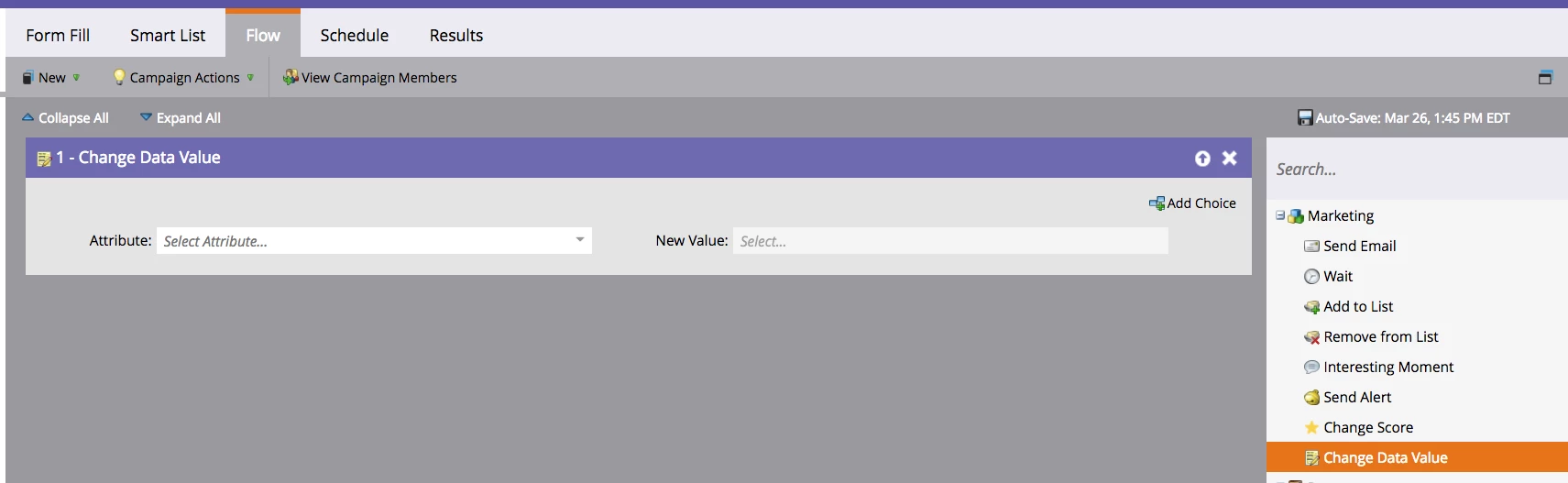
Change Data Value is not a page, it's a flow step that you can add to a smart campaign. See the screenshot below:

First you must create a smart campaign, then navigate to the Flow tab of the smart campaign. In the box on the right hand side, you will see a few different options and the change data value option lives there as well. Just drag the change data value flow step into the gray box to the left and that should get you what you need. Hope this helps!

1 reply

Accepted solution
March 26, 2018

Hi Atul,

Change Data Value is not a page, it's a flow step that you can add to a smart campaign. See the screenshot below:

First you must create a smart campaign, then navigate to the Flow tab of the smart campaign. In the box on the right hand side, you will see a few different options and the change data value option lives there as well. Just drag the change data value flow step into the gray box to the left and that should get you what you need. Hope this helps!