How to add 'View as Web Page' link to an email - Step by Step | Community
Skip to main content
May 25, 2016

How to add 'View as Web Page' link to an email - Step by Step

It is very easy to add 'view as a web page' link to your emails.

Step 1:

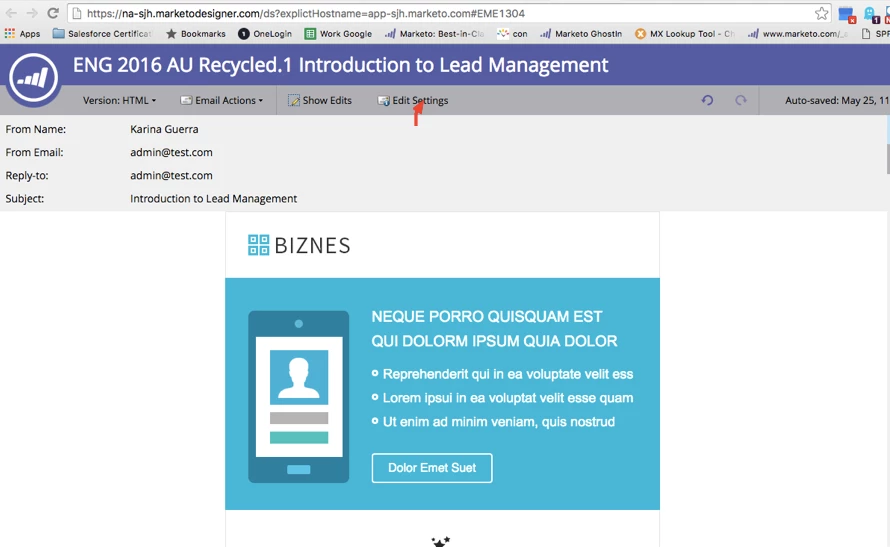
Click on edit settings on your email draft.
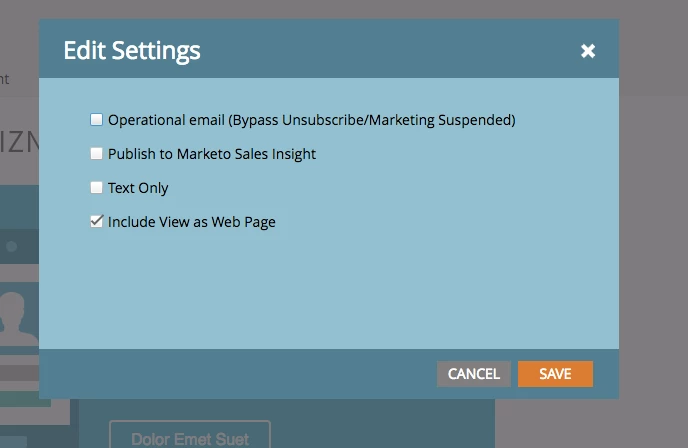
Step 2: Select "Include View as Web Page"
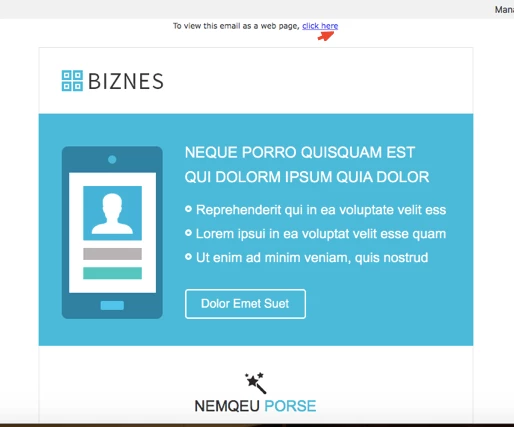
Step 3: Test it. Your email should include the vie as web page link as you can see in the image below.
This post is no longer active and is closed to new replies. Need help? Start a new post to ask your question.

10 replies

SanfordWhiteman
Level 10
November 22, 2016

The <TITLE> tag in the HTML dictates the tab title.

Translate
November 22, 2016

Is there a way to change the tab of the web view page? Mine shows the template name. I know how to change the tab name for a regular page but can't see to change it here.

Translate
SanfordWhiteman
Level 10
August 11, 2016

Replace the automatic token (in the Admin settings) with an empty HTML comment <!-- -->.

Then leave the "Include View as Web Page" checkbox checked, and also include the {{system.viewAsWebPageLink}}.

Translate
Katie_Owens1
Level 2
August 11, 2016

Is there a way to view what each segment gets? I sent myself a test of a segment, and the mail was correct, but when I click on "View as Webpage" I see the default segment's content. Thanks!

UPDATE: I could indeed see the segmented mail if i pasted the view as webpage token ( <a href="{{system.viewAsWebPageLink}}">View as Web Page</a>) into the text of the segment, not the "View as Webpage" link that is included as part of the email settings.

UPDATE 2: When I removed the "view as webpage" in email settings, the pasted token no longer worked - it now brought me to the default segment view as webpage. Seems like a little bug.

Translate
July 29, 2016

Thanks for sharing! We were just talking about this internally the other day, so the timing, and tips, came at the best time.

Translate
Eileen_DeLeon
Level 2
July 28, 2016

Guess I'll start combing through this code the old-fashioned way. Thanks @Sanford Whiteman​!

Translate
SanfordWhiteman
Level 10
July 28, 2016

Looks like the editor sees {{system.viewAsWebpageLink}} manully added to the email.  That's the reason it won't automatically remove it (it's not "system-managed"). So you will have to seek that out. Or else there's a bug here... not impossible!

Translate
Eileen_DeLeon
Level 2
July 28, 2016

Is there a way to turn this setting off? I turned it on for an email (using editor 2.0 if that has any quirks about it) but now the option is greyed out and I can't seem to turn it off.

When I hover over the greyed out option the help text says "Email already includes the {{system.viewAsWebpageLink}} token", almost as if the modal thinks I'm trying to turn it "on" rather than "off."

I tried searching for something to delete in the code, but I didn't fare very well. Ctrl+F would be very helpful right about now!

Translate
Colin_Mann
Level 4
June 23, 2016

Simple but useful thanks.

Translate
Joe_Reitz
Level 8
May 25, 2016

You can edit the formatting for this in Admin. And like others have mentioned, you can use a system token in a link... Like if you wanted to have it appear as a CTA button in your email. IMO, that's more useful for "forward to a friend."


Either way, I've never seen clicks on these be very high. ;)

Translate
If it doesn't look cool, you're probably doing it wrong.