How to create a program by using REST API? | Community
Skip to main content
New Participant
March 18, 2022
Question

How to create a program by using REST API?

  • March 18, 2022
  • 2 replies
  • 2705 views

Hi,

I am trying to create a new program in marketo using api calls.I am using the following post call according to documentation. But I am getting the below error.

 
"code""709",
            "message""Invalid folder type for program"
 
Not sure where am I going wrong. Below is the screenshot of postman script which I am using.
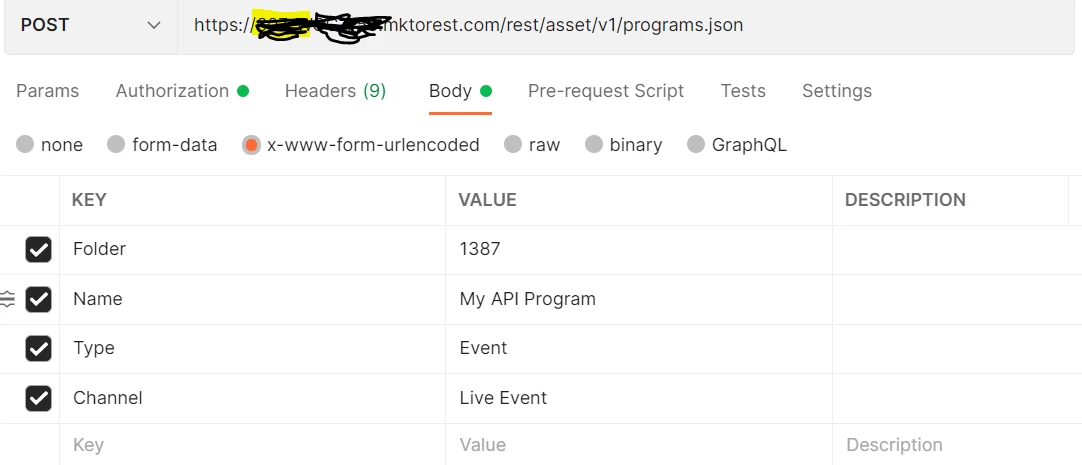
if anyone can help me on this then I will be grateful. Please do let me know if you need any more information.


Thanks,

Jitendra

This post is no longer active and is closed to new replies. Need help? Start a new post to ask your question.

2 replies

New Participant
March 22, 2022

Hi Darshil,

Thanks for your quick response. I am already trying to create a program under marketing activities and getting the error "Invalid Folder Type". I am doing this in default workspace. Below is the screenshot for your reference. I have highlighted the folder id (2091) which I am using in the api call.


Postman Screenshot:


Darshil_Shah1
Community Manager
March 22, 2022

Can you please use the Get Folder ID API endpoint to retrieve the folder id of the Marketo folder first? The ID from the UI is frequently mistaken for the actual folder ID (which can be used in the API calls), but it is not guaranteed to be the same. In most cases the ID from the URL in browser is relevant only for the UI.

Darshil_Shah1
Community Manager
March 18, 2022

Well, this means that you're trying to create a program in a folder that can't accommodate a Marketo program e.g. a design studio folder, you cannot do this via UI as well! Can you try selecting a valid folder for creating your Marketo program and use it's id instead? And also, when you send the form-url/encoded data, it is advised to URL encode it first. 

SanfordWhiteman
New Participant
March 18, 2022

And also, when you send the form-url/encoded data, it is advised to URL encode it first. 

Mandatory, even. 🙂


Though in this particular context, @jitendra.dalai is using Postman’s automatic URL encoding. So you wouldn’t want to manually encode the values in Postman, or they’d be double-encoded.

Darshil_Shah1
Community Manager
March 18, 2022

Yes! Not required for Postman (or other auto-url encoding services/clients).