
How to create a token for a radio button answer | Community
Skip to main content
Tracy_Boesken
New Participant
June 24, 2021
Question

How to create a token for a radio button answer

  • June 24, 2021
  • 1 reply
  • 2612 views

I need to send an alert email with the respondent's answers.

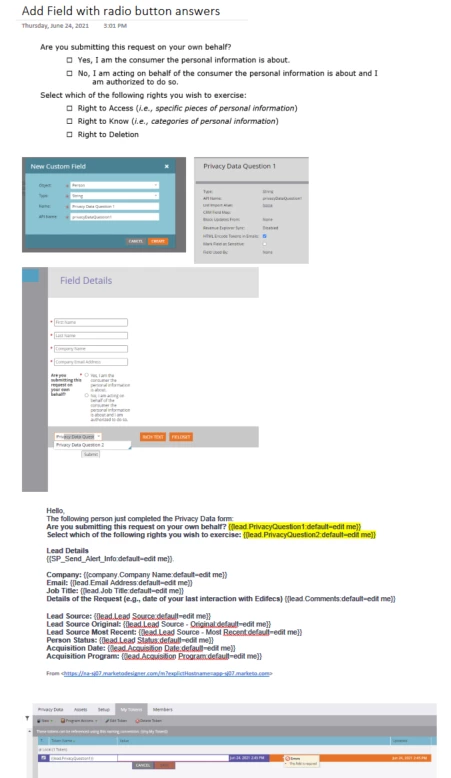
I need to write a token for a field I created in a form that has radio button answers.

If my token name is "{{lead.PrivacyQuestion1}}" then what is the value? 
This post is no longer active and is closed to new replies. Need help? Start a new post to ask your question.

1 reply

New Participant
June 25, 2021

Hi @tracy_boesken ,


I believe a radio button will come through as a string value of what was selected - eg "Yes, I am the consumer the request is about." Of course, this would be something you can check by submitting the form and checking the profile of the submitter.


If you need this to look different in the email output, then you could either run a smart campaign to change the value of that field before the send, or create an email script token that manipulates the value to something more appropriate for the recipient of the email. 

Tracy_Boesken
New Participant
June 25, 2021

Hi Phillip,

Thank you for your reply. 

If my alert email has this info to fill in:


Hello,

The following person just completed the Privacy Data form:

Lead Details

{{SP_Send_Alert_Info:default=edit me}}

Are you submitting this request on your own behalf? {{lead.PrivacyQuestion1:default=edit me}}

Select which of the following rights you wish to exercise: {{lead.PrivacyQuestion2:default=edit me}}


Then how do I set up this Token?

I assume I wouldn't place the "answers" in the value because there are 2 possible answers to lead.PrivacyQuestion1 field.

Thanks,

--Tracy


SanfordWhiteman
New Participant
June 25, 2021
Tracy, the stored value will only be what the end user selects. Other options appearing on the form will not be stored in the field.