How to enable mobile version in guided landing page ?
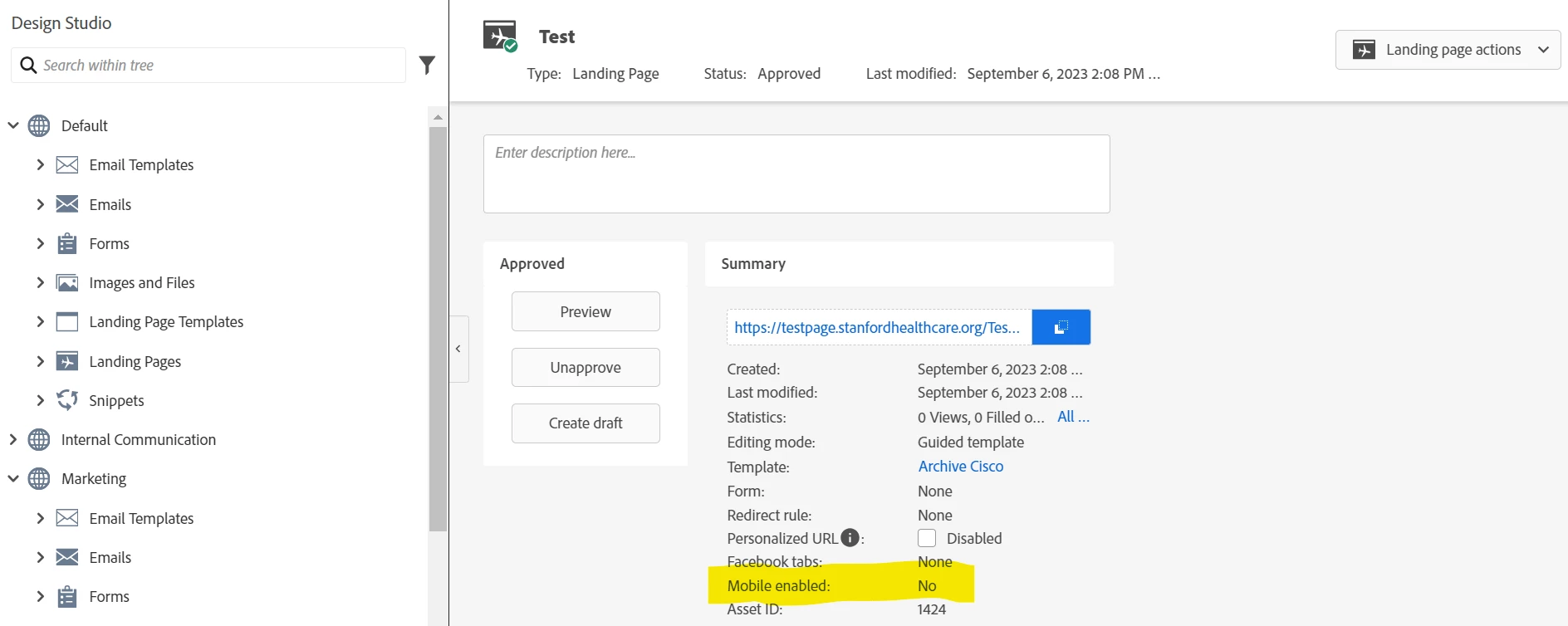
This landing page is created using guided landing page template which is mobile compatible. I'm not able to enable mobile version.
Does any one know how to enable?

This landing page is created using guided landing page template which is mobile compatible. I'm not able to enable mobile version.
Does any one know how to enable?
I'm fairly certain that "Mobile Enabled" has something to do with the legacy (Free-Form) version of Landing Pages. Guided Landing Pages are inherently "Mobile-Enabled" -- it's a more modern infrastructure compared to the ancient Free-Form pages which require something like this b/c they were developed at a time before mobile-responsive code was a standard practice. For that reason (and many more) I'd recommend NEVER using the Free-Form Landing Pages these days.
Said another way, there's nothing special to do to "enable" mobile on a Guided Landing Page, they just are that way -- and maybe this piece of the UI could/should be removed for Guided Landing Pages b/c it is pretty confusing. Perhaps it's just something that got overlooked in the design/dev cycle for the new UI but nothing to worry about at the end of the day.
Enter your E-mail address. We'll send you an e-mail with instructions to reset your password.