How to get an Email Program's smart list id? | Community
Skip to main content
New Participant
February 17, 2023
Solved

How to get an Email Program's smart list id?

  • February 17, 2023
  • 3 replies
  • 3953 views

Dear community,


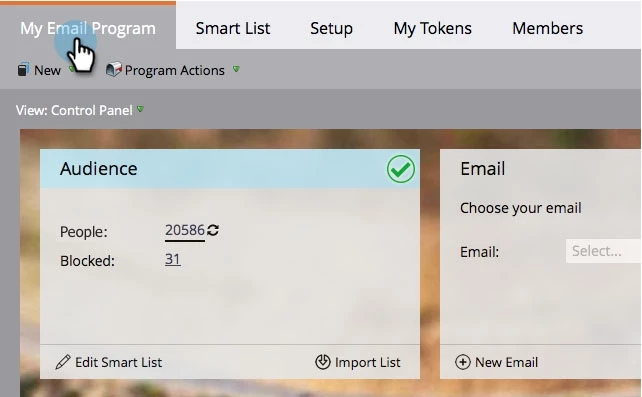
When creating an email program, you often define its audience using a smart list

Clicking on the number of people in the audience section opens a new browser tab with the people in that smart list - the url will look like https://app-nld123.marketo.com/?satellite=1#SL12345A1!  . Is there a way to get the smart list id 12345 programmatically, in order to query it for the members? I've tried to get smart lists by program folder ids, but this does not seem to include these "hidden" assets.


Goal: I want to determine audience sizes for several email programs, before the sends happen, in batch and without going into each program manually. (Maybe there's another way?)


Thanks! 🙂

Best answer by SanfordWhiteman

Sorry to butt in, but it’s not hidden and it’s not temporary!

https://{{munchkinId}}.mktorest.com/rest/asset/v1/program/{{programId}}/smartList.json


3 replies

SanfordWhiteman
SanfordWhitemanAccepted solution
New Participant
February 18, 2023

Sorry to butt in, but it’s not hidden and it’s not temporary!

https://{{munchkinId}}.mktorest.com/rest/asset/v1/program/{{programId}}/smartList.json


lukeaAuthor
New Participant
February 19, 2023
Darshil_Shah1
Community Manager
February 17, 2023

AFAIK you're not able to query the system SL as they aren't saved. This is contrary to campaigns, wherein you can query even the background campaigns (along with the user-created campaigns), as unlike the SLs, they stay associated with the program. It's always best to create an SL in the cloneable program template itself.


lukeaAuthor
New Participant
February 18, 2023

Understood, I was not aware of the temporary character of these lists. Thanks for clarifying.

AWmindtree
New Participant
February 17, 2023

Hi @lukea 
With my believe, you'll not be able to get the system created smart list under a program via api.
Workaround- You can create a Local Smart list under that program and add filters. Then use it in Email Program Smart List like "Member of Smart List- (Your Local Smart List Name)".
Then fetch the local Smart List with the below endpoint:
XXX-XXX-XXX.mktorest.com/rest/asset/v1/folder/{id}/content.json?type=Program

Let me know if that works.

Thanks

lukeaAuthor
New Participant
February 17, 2023

Thanks. Yup, that's how I currently do it. I hoped there might be a "direct" solution, maybe undocumented. (Also because the setup is not under my full control - some folks set it up in program, not as a separate asset.) I will leave this open for a few days, and "mark as correct" if no other ideas pop up.