
How to get forms2.min.js to work in IE? | Community
Skip to main content
Robb_Barrett
New Participant
December 14, 2015
Solved

How to get forms2.min.js to work in IE?

  • December 14, 2015
  • 3 replies
  • 3809 views

Hello, I have a page with an embedded form that's giving me problems in IE only. 
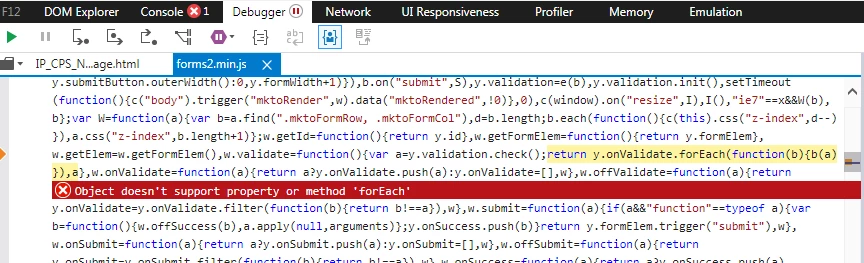
According to what I've read, IE doesn't support forEach.  So what's the work-around for this? 

Works fine in FF and Chrome, but of course IE is the browser we'll most likely have to accomodate.

Best answer by Robb_Barrett

Your hint of Edge helped me solve it.

The following code needs to be placed in the head tag and it works like a charm.

<meta http-equiv="X-UA-Compatible" content="IE=edge" />

3 replies

Robb_Barrett
Robb_BarrettAuthorAccepted solution
New Participant
December 15, 2015

Your hint of Edge helped me solve it.

The following code needs to be placed in the head tag and it works like a charm.

<meta http-equiv="X-UA-Compatible" content="IE=edge" />

Robb Barrett
March 10, 2016

Hi,

We recently changed our marketo pages to ssl so that we could embed them on our secure site. Now it turns out the form do not show up at all on IE. I tried placing this code in the head tag of the template the the landing pages call on. But the forms still do not show up.

<meta http-equiv="X-UA-Compatible" content="IE=edge" />

The forms also do not show up on the iphone 5.

any thoughts.

SanfordWhiteman
New Participant
March 10, 2016

Please post the URL of an example page.

I suspect you hard-coded plain-text (...) somewhere instead of using protocol-relative URLs (//...)

Jamie-Carey
New Participant
December 15, 2015

I don't know the answer to your question, but A++ on the tags.

Kenny_Elkington
New Participant
December 15, 2015

Which version/compatibility mode are you seeing this on?  Do you have an example page where we could see this in action?

Robb_Barrett
New Participant
December 15, 2015

it.gehealthcare.com/IP_CPS_Nurture_2_2015_All-In-One-Page.html?asset=autodemo

IE11. I've tried this on v8 compatibility and it looked hideous.

The problem manifests when you submit the form. 

Robb Barrett
Kenny_Elkington
New Participant
December 15, 2015

I can't seem to replicate this, though I'm trying to emulate from Edge and not IE11.  I'll try again when I have access.