How to Prevent Salesforce Duplicate in Marketo | Community
Skip to main content
Charlotte_Berth
New Participant
October 12, 2023
Solved

How to Prevent Salesforce Duplicate in Marketo

  • October 12, 2023
  • 1 reply
  • 1109 views

Hello,
Our emails addresses in Marketo are not all synchronized with Salesforce and we don't want that to change. However, we want leads and contacts in Salesforce to be synchronized to Marketo. But we want to prevent duplicates from Salesforce in Marketo. How can we do this given the fact that even by preventing the duplicates, we need some fields from Salesforce to be added to the contact in Marketo (ex: SFDC Type,..)? Could we merge the Salesforce contact with the Marketo contact?

Any idea?

Many thanks
Best regards,

This post is no longer active and is closed to new replies. Need help? Start a new post to ask your question.
Best answer by Darshil_Shah1

Could we merge the Salesforce contact with the Marketo contact?

Yes, You certainly can merge records in Marketo! In fact, CRM (SFDC, MS Dynamic) is one of the input sources where Marketo doesn't auto-de-duplicate on record creation, unlike other input sources like form fill, list import, etc. Check out this article on finding and merging duplicate people in Marketo on the experience league product documentation. By default, the winning person record would persist and its data values would take precedence in case of conflict (i.e. if the losing record also has a value for a field). Also, when a Marketo-only and a CRM synced records are merged, the CRM synced record is always persisted and considered as the winning record. See this Marketing Nation article on understanding merges in Marketo that explains it well with illustrations.


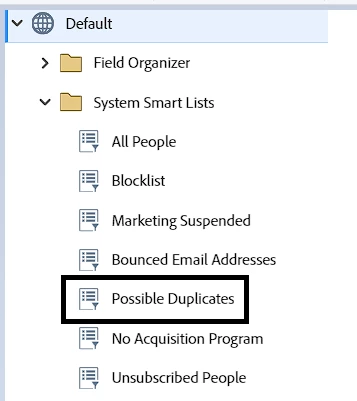
Possible Duplicate System Smart List 
Smart List filter: Duplicate Fields

As a bonus tip, you could create a recurring batch campaign in Marketo to look for possible duplicates (reference the Possible Duplicates standard system smart list available in the Database section or just pull the Duplicate Fields filter in the campaign's smart list) based on the email address with the person source as CRM and add those people to the static list for you to evaluate later.


1 reply

Darshil_Shah1
Darshil_Shah1Accepted solution
Community Manager
October 12, 2023

Could we merge the Salesforce contact with the Marketo contact?

Yes, You certainly can merge records in Marketo! In fact, CRM (SFDC, MS Dynamic) is one of the input sources where Marketo doesn't auto-de-duplicate on record creation, unlike other input sources like form fill, list import, etc. Check out this article on finding and merging duplicate people in Marketo on the experience league product documentation. By default, the winning person record would persist and its data values would take precedence in case of conflict (i.e. if the losing record also has a value for a field). Also, when a Marketo-only and a CRM synced records are merged, the CRM synced record is always persisted and considered as the winning record. See this Marketing Nation article on understanding merges in Marketo that explains it well with illustrations.


Possible Duplicate System Smart List 

Smart List filter: Duplicate Fields

As a bonus tip, you could create a recurring batch campaign in Marketo to look for possible duplicates (reference the Possible Duplicates standard system smart list available in the Database section or just pull the Duplicate Fields filter in the campaign's smart list) based on the email address with the person source as CRM and add those people to the static list for you to evaluate later.