How to set up {{lead.xxx}} token in Webinar JoinNow | Community
Skip to main content
Yun_Bai1
New Participant
October 17, 2017
Solved

How to set up {{lead.xxx}} token in Webinar JoinNow

  • October 17, 2017
  • 1 reply
  • 3367 views

Hello,

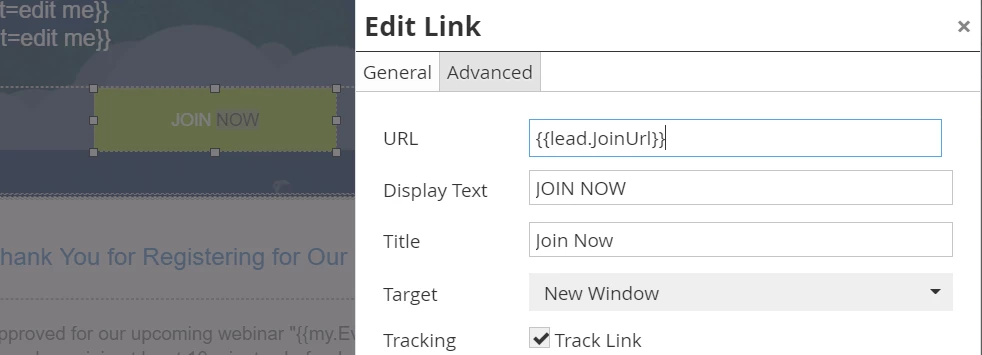
I am having the hard time to find the {{lead.JoinUrl}} token. Basically, after I sent the webinar registration confirmation email to myself as sample, I wasn't able to click on "Join Now" button in the email. I checked the hyperlink for "Join Now" button, which shows me {{lead.JoinUrl}}. I wasn't sure why this is not working and I want to solve this issue by understanding how did this token had been set up  and where it located.

PS: We use Zoom to set up webinar. The integration between Zoom and Marketo had been set up already.

Anyone familiar with webinar, token, can you please share with me some tips or thoughts?

Thank you in advance,

Becky
This post is no longer active and is closed to new replies. Need help? Start a new post to ask your question.
Best answer by Yun_Bai1

Hi Josh,

Thank you for your input, which does make sense. The issue had been solved this morning before I checked your response. It was because there is a space after the Zoom webinarID in "my token" filed. So it wasn't able to call Zoom correctly, therefore wasn't able to get the correct response from Zoom neither.

Thank you for your help again,

Becky

1 reply

October 17, 2017

Hi Becky,

The token you are looking for is {{member.webinar url}}.

-Sally

Josh_Hill13
New Participant
October 17, 2017

Zoom's Integration is NOT the same as GTW and Webex. The member.webinar url will not work here.

Becky is correct that there is a field like lead.joinURL in her database.

The problem is that Send Sample will NOT populate this field because you have to do a live registration for Zoom to push back that URL. Please setup the entire Webinar PRogram, connect the Zoom Webinar, and actually register via the form page. You should then get the correct URL back.

If you do not, then I suggest reviewing the Zoom setup guide to ensure the pieces are in place and create a Smart List view that shows the related Zoom info.

Yun_Bai1
Yun_Bai1AuthorAccepted solution
New Participant
October 17, 2017

Hi Josh,

Thank you for your input, which does make sense. The issue had been solved this morning before I checked your response. It was because there is a space after the Zoom webinarID in "my token" filed. So it wasn't able to call Zoom correctly, therefore wasn't able to get the correct response from Zoom neither.

Thank you for your help again,

Becky