How to stop a large import into a static list? | Community
Skip to main content
Zoe_Forman
Community Manager
June 5, 2023
Solved

How to stop a large import into a static list?

  • June 5, 2023
  • 1 reply
  • 1728 views

The import is running but I see that below the rows I need, after a gap or a hundred rows  there are values in one column reaching over 87,000

I have tried to delete the list but says I need to stop the import - but how?

There are 500 rows of data I need.
Tried refreshing, and changing the browser, any suggestions or just let it run it's course over night?

This post is no longer active and is closed to new replies. Need help? Start a new post to ask your question.
Best answer by Darshil_Shah1

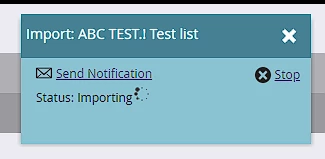
You can just cancel the list import process by clicking the x Stop in the list import process dialog (snapshot below).

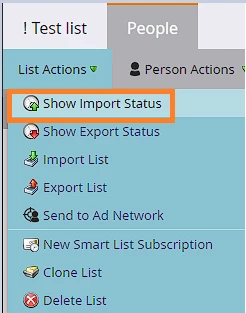
if you don't see the status dialog box, just click on List Actions dropdown > Show Import Status to get the list import status dialog on your screen (snapshot below), and then hit on x Stop to suspend the list import process. You should be able to delete the list after that.


1 reply

Darshil_Shah1
Darshil_Shah1Accepted solution
Community Manager
June 5, 2023

You can just cancel the list import process by clicking the x Stop in the list import process dialog (snapshot below).

if you don't see the status dialog box, just click on List Actions dropdown > Show Import Status to get the list import status dialog on your screen (snapshot below), and then hit on x Stop to suspend the list import process. You should be able to delete the list after that.


Zoe_Forman
Community Manager
June 6, 2023

I forgot to add that I was in Sandbox, and none of the options you suggest were available to me, which is how I would do this in the main platform.

It did run its course overnight, and I have been able to delete the list .

Lesson learnt scroll down and check files when handed over!  Hidden rows of copied value.

Darshil_Shah1
Community Manager
June 6, 2023

@zoe_forman wrote:

I forgot to add that I was in Sandbox, and none of the options you suggest were available to me, which is how I would do this in the main platform.


Interesting! The snapshots that I added in my previous comment are from a test sandbox instance only, and I always see all the options in the List Actions in it.