How to take away the contact from one list to another one | Community
Skip to main content
July 3, 2017
Solved

How to take away the contact from one list to another one

  • July 3, 2017
  • 2 replies
  • 2462 views

Good morning,

i'm new using Marketo and i'm trying to learn more and more every day but sometimes to look for what you need is not really easy so here I am :-)

I have to make 2 different emails but the first list i need to use contains also the leads of another list that i have to use at the same time. I would like to take away the leads of the second list from the firts one. Is there a way to do it massively, avoiding to do it manually?

Maybe inserting a filter into the camapign?

Thanks a lot!

Eleonora
This post is no longer active and is closed to new replies. Need help? Start a new post to ask your question.
Best answer by Gerard_Donnell4

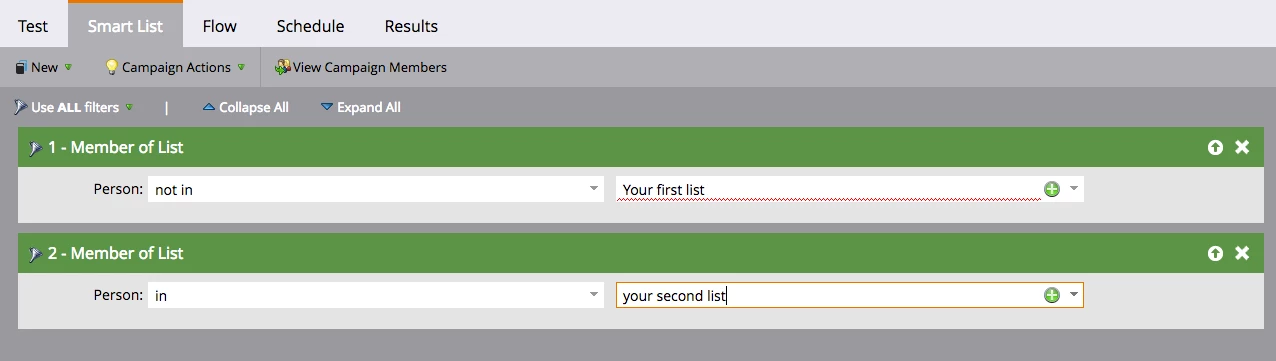
ok, so what I would do is create two smart campaigns.  One for each email send.  The first email I would send to the first list.  With the second send I would use the following smart list filters:

Member of List > Not in > the first list.

&

Member of List > in > the second list.

This will then only pull in the leads who are in the second list and not in the first.  Is this what you are after?

2 replies

Gerard_Donnell4
New Participant
July 3, 2017

Hi Eleonora Condidorio​,

Can you give a little more detail.  Are both these emails to be sent at the same time?  Are they both in the same program?

You can set this up a couple of ways. You could use the send email flow step with choices added to it.  In the example I have used below I have used a list choice.  If the emails are set up as completely separate email programs you could also use the "member of program choice".  You could also send the first email and then wait until that email has been sent and use the choice "If not was sent email" to separate the leads. If you cant work it out from this, provide some more details and I'll try and give you better instruction.

July 3, 2017

Thanks Gerard for your response.

Yes they are part of the same program and I should send them at the same time but I can even decide to send them separately.

If I send them in a different time, can I still use the same choice of your example?

Thanks,

Eleonora

Eleonora Condidorio

Sales & Marketing, EMEA HCM

Mobile: +39 3405634903

Email: Eleonora.Condidorio@tribridge.com<mailto:Eleonora.Condidorio@tribridge.com>

Gerard_Donnell4
Gerard_Donnell4Accepted solution
New Participant
July 3, 2017

ok, so what I would do is create two smart campaigns.  One for each email send.  The first email I would send to the first list.  With the second send I would use the following smart list filters:

Member of List > Not in > the first list.

&

Member of List > in > the second list.

This will then only pull in the leads who are in the second list and not in the first.  Is this what you are after?

SanfordWhiteman
New Participant
July 3, 2017

Welcome! You should first move this thread to Products. This space (Champion Program) isn't for support, it's for discussions of the Champs incentive program.

July 3, 2017

Thanks for the suggestions, i have done it!