How to Upload/Sync Marketing Suspended List into SFDC | Community
Skip to main content
Yun_Bai1
New Participant
November 7, 2017
Solved

How to Upload/Sync Marketing Suspended List into SFDC

  • November 7, 2017
  • 1 reply
  • 4347 views

Hello Marketo Expert,

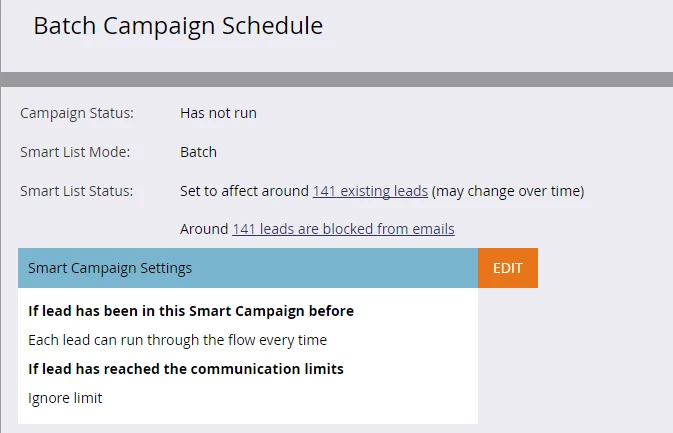
I am having a challenge of sync leads to SFDC, which you can tell that there are 141 leads I imported into Marketo and try to sync to SFDC. However, 141 leads are blocked from emails. The reason I can think of is probably those 141 leads are marketing suspended or unsubscribed leads. So that's the reason they got blocked when trying Sync to SFDC.

If my assumption is correct, can I have any tips from you of how to deal with this case? And if I am able to sync leads to SFDC, how can I mark them as Marketing Opt-out lead?
Thank you in advance,

Becky

This post is no longer active and is closed to new replies. Need help? Start a new post to ask your question.
Best answer by Yun_Bai1

Ok, based on this, it looks like the leads are syncing but the campaign statuses just aren't getting updated.

If the SFDC campaign are connected to marketo programs--even if the new leads are not yet members of the Marketo program--you must change your flow step to "Change Program Status" and find the program that is linked to the SFDC campaign you want to add them to.


Hi Trevor,

We ended up manually changed the SFDC campaign members' status in SFDC. It works and members showed up...

For this case, I think it maybe because how we imported those leads into Marketo, the columns and data values in the excelsheet.  I have no problem to sync them into SFDC, when I imported more leads in a different SC.

Thank you for your help here:)

Best

Becky

1 reply

Trevor_Parsell
New Participant
November 7, 2017

Hey Becky,

You should still be able to run the smart campaign and sync the leads. You just are not able to email these people. Did you try syncing these over and they will not sync?

Thanks!

Trevor

Josh_Hill13
New Participant
November 7, 2017

Yes!

Remember it's just letting you know about emailability. Has nothing to do with other flow steps.

Yun_Bai1
Yun_Bai1Author
New Participant
November 7, 2017

Thank you Josh!

Oh, I see what the blocked email mean. It just I wasn't able to sync leads to SFDC, for some reason it skipped 141 leads.

My flow steps are pretty standard, a couple of "Change data value", then "Change score", "Assign to", "Change status in SFDC campaign". It has the same setting for my other import and sync leads SCs. Just not sure why this one wasn't able to sync to SFDC. Please let me know any of your thoughts.

Best,

Becky