How to use a webhook to send form data to another Marketo instance? | Community
Skip to main content
October 12, 2018
Solved

How to use a webhook to send form data to another Marketo instance?

  • October 12, 2018
  • 3 replies
  • 7590 views

Hi,

We have a smart campaign, "test send to instance", that is triggered based on fill out form = test_form. Under the flow tab, we added Call webhook where webhook = "webhook_send". Under the schedule tab, campaign status is active and Run each leave through the campaign flow = every time.

The goal is to send data from one Marketo instance (foo_instance) to another one (bar_destination) through the webhook_send securely after the form has been submitted. We were able to load test_form onto a web page and are able to see the data come into foo_instance successfully and when we view the Activity Log we can see the webhook_send being triggered with no errors. However, when we go to bar_destination instance, we do not see the lead created or updated.

How would we use the webhook to send data from foo_instance to bar_destination?

Webhook:
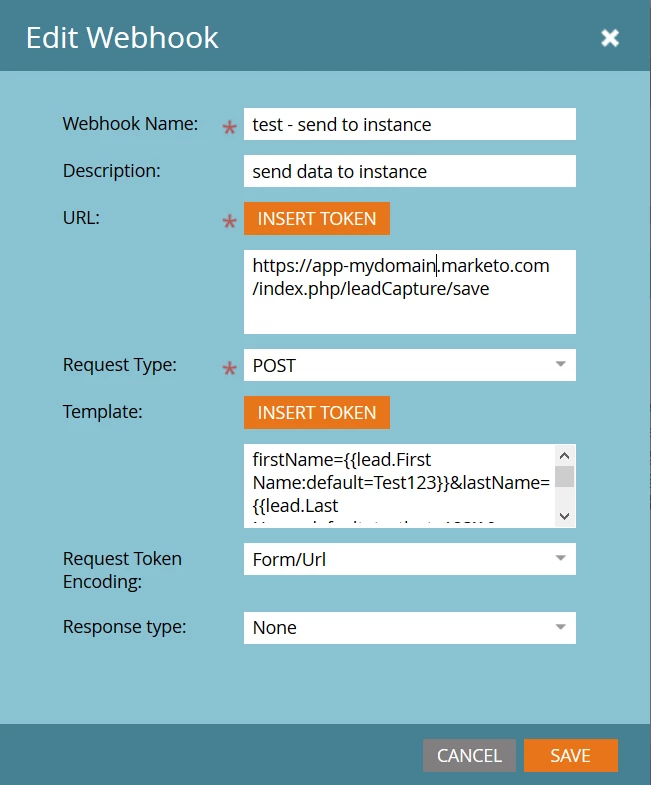
Template does include the following:

  1. firstName
  2. lastName
  3. email
  4. munchkinId (from bar_destination)
  5. formId (from bar_destination)
This post is no longer active and is closed to new replies. Need help? Start a new post to ask your question.
Best answer by SanfordWhiteman

You're not using the right field names. Use the SOAP names.

3 replies

New Participant
August 24, 2022

Hi question for you, how did you identify the URL to use for the receiving instance?

SanfordWhiteman
New Participant
August 24, 2022

It’s actually no longer possible to do it this way. This post by Sponge’s Todd Sprinkel explains a modern solution.

SanfordWhiteman
New Participant
October 12, 2018

Also please change your profile to use a real name, as recommended by Community Guidelines.

SanfordWhiteman
SanfordWhitemanAccepted solution
New Participant
October 12, 2018

You're not using the right field names. Use the SOAP names.

October 12, 2018

After switching from REST to SOAP field names, I was able to get this to work properly. In review, I found this to be a flexible solution as the webhook can be added to any Smart Campaign, but would you say this is secure enough when sending data to another instance?

SanfordWhiteman
New Participant
October 12, 2018

Define "secure."

Form posts are SSL-encrypted. They don't require authentication. So this is the same as any Marketo form post, security-wise.

Reliability-wise, it is subject to significant restrictions relative to form posts straight into the other instance, as you can't execute 100s of thousands of webhooks (but could post hundreds of thousands of forms, i.e. if you get a hacker's attention).