How to verify what smart campaign has been chosen for a program, after it has been added to a stream? | Community
Skip to main content
New Participant
December 9, 2020
Solved

How to verify what smart campaign has been chosen for a program, after it has been added to a stream?

  • December 9, 2020
  • 1 reply
  • 4192 views

Hello again Marketo Nation,


Hope you are doing well!


Here comes yet another question, I was hoping you could help me answer:


How to verify what smart campaign has been chosen for a program, after it has been added to a stream?


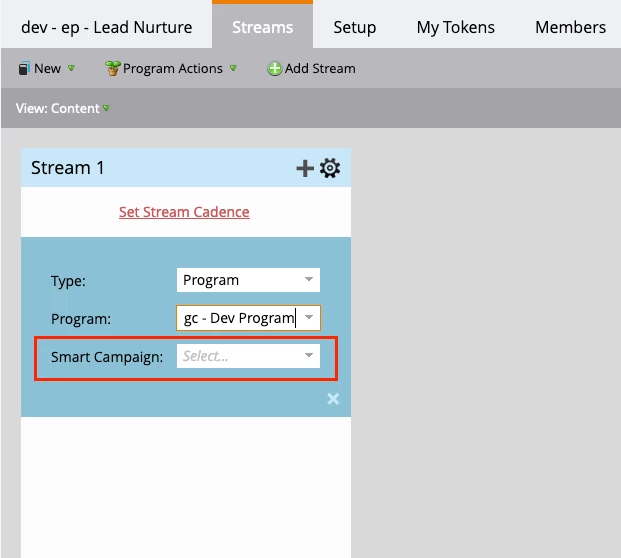
When adding a program to a stream, one must choose a smart campaign:
 

Once the program has been added, you can click on the configuration-cog-icon, to see the options for what you can do/check, but there is no info about what smart campaign was chosen for the program, in any of the options:
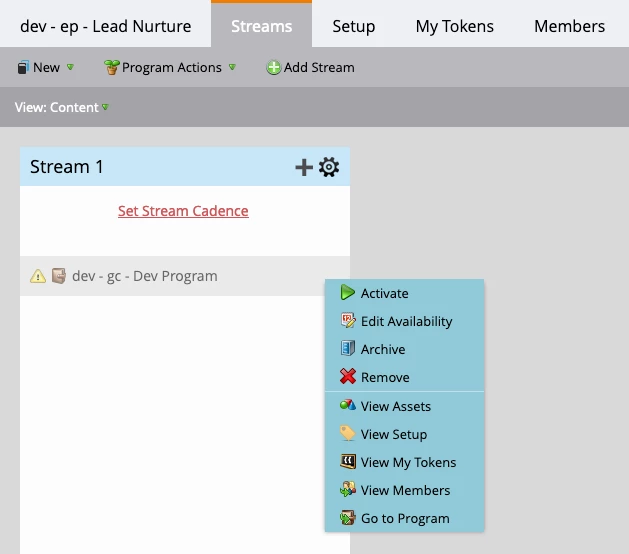
 

So, how to verify what smart campaign was chosen?


Thanks for your help in advance!


Best,

ernie


This post is no longer active and is closed to new replies. Need help? Start a new post to ask your question.
Best answer by AbhinavSa2

Hi @nestojosa 

Got your point. As per best practice while using nested default program in engagement streams you must have a single smart campaign just to send out the email. As in stream you'll see only program name.

However, you can have all the details in engagement stream performance report. 


Regards,

Abhinav

1 reply

Employee
December 9, 2020

Hi,

Hope you are doing good. While using nested default program in marketo engagement stream you must have a smart campaign inside along with "Member of engagement program -> Name of engagement program" mandatory filter to use nested program. below is the screen shot for your reference.


Once you'll have this filter you'll get the option to add smart campaign in your stream. In flow you can add "send email" filter and choose your email. 


NestoJosaAuthor
New Participant
December 10, 2020

Hello @abhinavsa2 


Thanks for your response!


What I am trying to do is to check/verify what smart campaign has been chosen for a particular program.


The problem is not that I cannot choose a smart campaign for a program. On the following screen you can see that its possible to choose amongst a list of smart campaigns, when adding the program to the stream:


The problem I am trying to solve is, how to check what smart campaign has been chosen for a program, once it has been added to a stream.


In the following screen, you can see that I have added a number of programs to a stream (the black lines are there just to hide some client specific information):


So, how to check what smart campaign was chosen for one of the programs from above?

Thanks again for your time!
Best,

ernie

AbhinavSa2Accepted solution
Employee
December 10, 2020

Hi @nestojosa 

Got your point. As per best practice while using nested default program in engagement streams you must have a single smart campaign just to send out the email. As in stream you'll see only program name.

However, you can have all the details in engagement stream performance report. 


Regards,

Abhinav