I want to change Favicon | Community
Skip to main content
May 22, 2015
Solved

I want to change Favicon

  • May 22, 2015
  • 2 replies
  • 7931 views

Hi all

I found my LP loading /favicon.ico and be causing timeout.

I read Marketo Tip 1: Favicon on Marketo Landing Pages Marketo Hidden Tricks and TipsMarketing Rockstar Guides

And I inserted <link> tag explicitly and correctly.

But marketo still inserts another <link> tag.
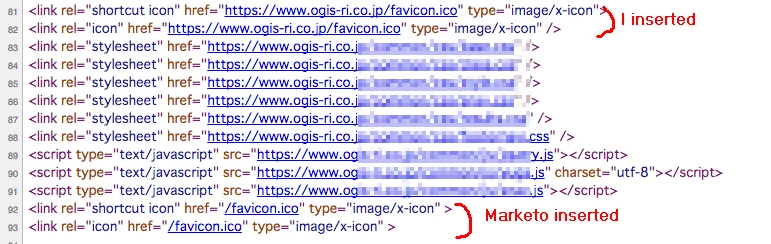
How to trim or override marketo Favicon <link>?

This post is no longer active and is closed to new replies. Need help? Start a new post to ask your question.
Best answer by Steven_Vanderb3

こんにちは、ジョナサン


My templates does not include "/favicon.ico" .

I wrote correct two lines "/rs/999-XXX-999/images/favicon.ico" at LP editor.

But "/favicon.ico" come from anywhere.

See my very simple LP example

pages-demo.ogis-ri.co.jp/test_NoFavicon.html


Now I found new thing.

Marketo official LP has same issue.

マルケトへのお問い合わせ

This instance does not have "pages2.marketo.com/favicon.ico" but inserted "/favicon.ico" lines.


Hi Takehiro,

This is something that I've noticed happening as well.  For an immediate fix, you can create a redirect rule to go from cname.yourdomain.com/favicon.ico to point to /rs/999-XXX-999/images/favicon.ico Redirect a URL Path - Marketo Docs - Product Docs.

2 replies

April 14, 2016

I found new feature to disable default favicon links.

Admin => Integrartion => Landing Pages => Edit

Current docs doesn't make a mention of this.

SydneyMulligan
New Participant
October 19, 2017

This needs to be shouted from the rooftops.

SanfordWhiteman
New Participant
October 20, 2017

This needs to be shouted from the rooftops.

How about this, too?

Josh_Hill13
New Participant
May 22, 2015

you should load the favicon into Marketo and put in the full URL to the icon.

June 24, 2015

Thanks Josh

After uploaded, Marketo instance still insert two tags link to root path.

But favicon works fine.

Ummmm

<link rel="shortcut icon" href="https://nation.marketo.com/rs/999-XXX-999/images/favicon.ico" type="image/x-icon" >

<link rel="icon" href="https://nation.marketo.com/rs/999-XXX-999/images/favicon.ico" type="image/x-icon" >

<link rel="shortcut icon" href="https://nation.marketo.com/favicon.ico" type="image/x-icon" >

<link rel="icon" href="https://nation.marketo.com/favicon.ico" type="image/x-icon" >

July 10, 2015

Takehiro-san,

Are you sure that these two lines are not hard coded in your templates?  Marketo does not automatically insert Favicon <link> tags into pages, so I suspect this is actually code that was accidentally inserted in the template.

When you added the "/rs/999-XXX-999/images/favicon.ico" link, did you do this in your template, or using custom HTML in the Landing Page editor?