In Future / In Future After Filters on Multiple Custom Objects | Community
Skip to main content
New Participant
September 12, 2023
Solved

In Future / In Future After Filters on Multiple Custom Objects

  • September 12, 2023
  • 1 reply
  • 2291 views

Hello all,


we have a problem and I wonder if anyone had a creative solution for it.

We have a Custom Object created for sending our Expiration Emails based on the Product End date purchased.

One custom object created as a Service agreement -  linked to Lead ID in the Marketo database and has a relationship like below

1 product vs. 1 lead

multiple product vs. 1 lead


We need to build a Smart List that finds all customers whose contracts expire in exactly 90 days. 

In Future after X-1-> so we add 89 days 

In Future X days -> so we add as 90 days
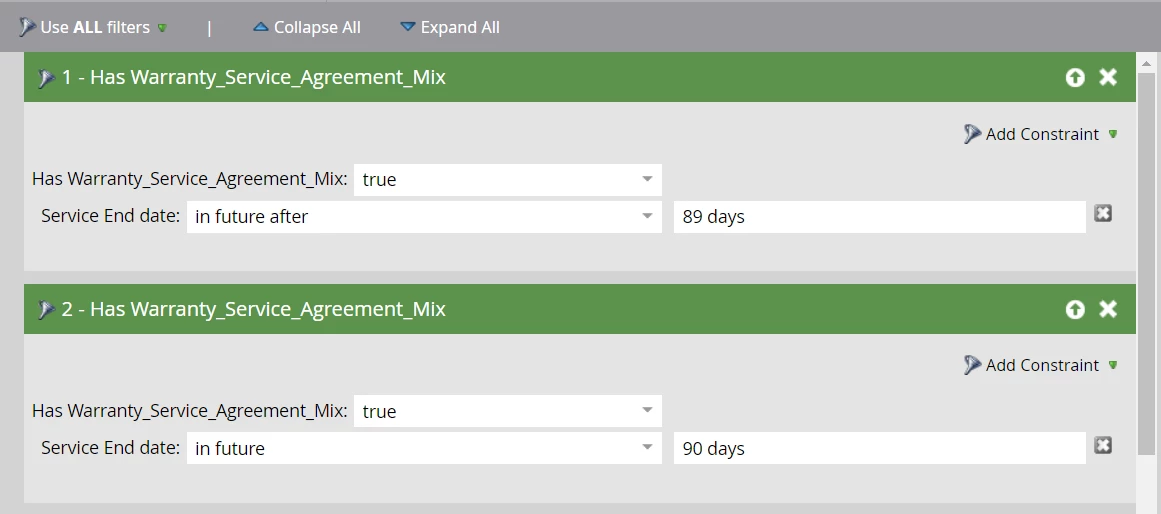


But the results are not expected, because of the multiple Contract on the same person. It qualifies the contact even with the Empty END date. Not exactly ending in 90 days is not qualified here. 


If someone can suggest any solutions for this, it would be a great help.

 

This post is no longer active and is closed to new replies. Need help? Start a new post to ask your question.
Best answer by Darshil_Shah1

Yeah, this is the expected behavior as each filter you have in the smart list is filtering the custom objects associated to the person’s record individually. An obvious solution to remedy/walk around this and people getting qualified even if they have expiration date field empty is to have a duplicate field with exact same date on each of the CO record and use both the fields as constraints with different operators (in future and in future after) in the same Has Custom Object filter.

1 reply

Darshil_Shah1
Darshil_Shah1Accepted solution
Community Manager
September 12, 2023

Yeah, this is the expected behavior as each filter you have in the smart list is filtering the custom objects associated to the person’s record individually. An obvious solution to remedy/walk around this and people getting qualified even if they have expiration date field empty is to have a duplicate field with exact same date on each of the CO record and use both the fields as constraints with different operators (in future and in future after) in the same Has Custom Object filter.

Jo_Pitts1
Community Manager
September 12, 2023

@manjuladevipal@darshil_shah1 is correct.  

To explain in a bit more depth; If a person has two service contracts (let's call them A and B), A could meet one constraint, and B could meet the other constraint.  If that occurred, then the person has qualified.


You've bumped into one of the frustrations of Marketo; namely that you can't use the same constraint twice in a single filter.


The solution (to @darshil_shah1's point) is to have the same field twice in your CO, and ensure it always has the same value in both fields.  That way you can add both constraints to a single flow step, meaning they will be evaluated for the same CO.  


Don't forget, when you are building your emails, you'll need to loop through the COs to find which one(s) qualified for the email.


Regards

Jo


New Participant
September 13, 2023

Hai  


Thanks for the in-depth explanation. We understood the logic here.


Now the function works fine.


Manjuladevi P