Include Form Fields & Settings in Overview Section | Community
Skip to main content
marypaine
New Participant
June 21, 2023
New

Include Form Fields & Settings in Overview Section

  • June 21, 2023
  • 1 reply
  • 928 views

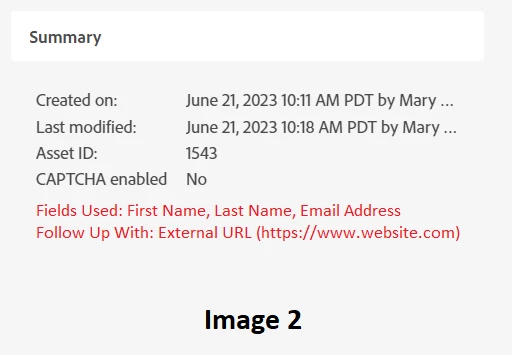
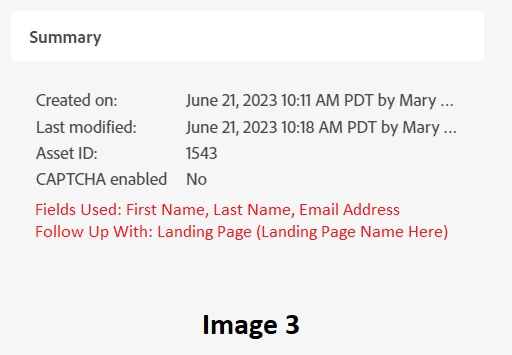
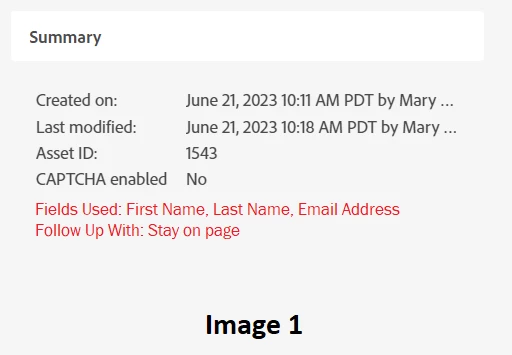
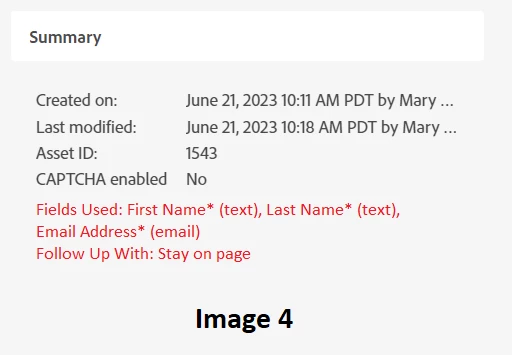
Quick idea here! I think it would be helpful to be able to see the fields that are in use in a form as well as what is set for "Follow Up With" in the Overview of the form (without having to create a draft). I mocked up what I was thinking these could look like using MS paint (so bear with me)! They could either fall under the Summary section or an entirely new section/tab could be created for them.


Image 1: Stay on page option
Image 2: External URL option
Image 3: Landing page option


To start, just have the field names would be great. A nice addition would be the ability to see if a field is required and what the field type is (image 4).
 

1 reply

michellechopin
Community Manager
June 21, 2023

This is a great idea! I regularly have to confirm certain form information and it's added steps/inconvenience to have to create a draft just to see hidden fields or the URL details of the form submission redirect. Being able to see those key details in a summary tab or section would be super helpful and reduce the risk of leaving forms in a draft format too.


This looks like it would be similar to the existing smart campaign and program summaries, so hopefully this is something Adobe could implement (and easily!).