Including a field in Rich Text HTML | Community
Skip to main content
New Participant
October 1, 2018
Solved

Including a field in Rich Text HTML

  • October 1, 2018
  • 2 replies
  • 6474 views

Hi there,

I was wondering if anyone has ever successfully entered a field input element into the Rich Text editor area of a form. We have a lot of styling with our forms and landing pages that's making this request a nightmare. I just want the checkbox for our opt-in field to be lined up left of "label". This would typically take one minute, but due to all the styling I can't cut one bit of html/css down without having issues pop up elsewhere.

This is what I'm trying to do

<input name="Marketing_Opt_In__c" id="Marketing_Opt_In__c" type="checkbox" value="yes" class="mktoField" /> I wish to receive future informational and marketing communications.
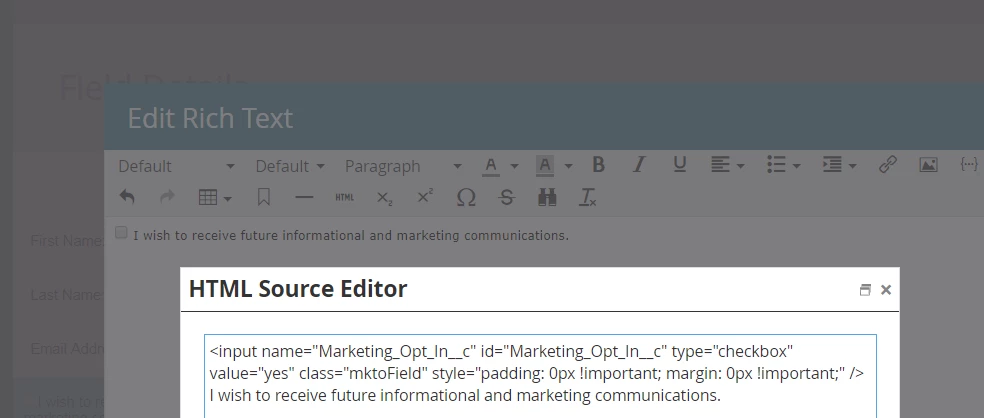
The field shows in the form, but it's not functional. I know this is a wacky way to achieve what I'm trying to do, but I've been on and off this request for far too long and I feel like this is the easiest way to get it done without overhauling all the stylesheets and LP html.

Any help would be appreciated.

Thanks!

This post is no longer active and is closed to new replies. Need help? Start a new post to ask your question.
Best answer by SanfordWhiteman

Yes, I do this all the time!

But that field is not going to be known to the forms library (it is "functional" at the HTML level) unless you also use JS to read the checked value into a Hidden field on submit.

2 replies

New Participant
March 28, 2022

Since "Rich Text" is not a field type, how to recognize/render "Rich Text" via REST API for externally hosted form?

Jo_Pitts1
Community Manager
March 28, 2022

@rajnikant-modi,

This is quite different to the original topic.  Can you create a separate thread please? 


Also, the question is a little murky.  Can you provide a little more clarity please?


Cheers

SanfordWhiteman
SanfordWhitemanAccepted solution
New Participant
October 1, 2018

Yes, I do this all the time!

But that field is not going to be known to the forms library (it is "functional" at the HTML level) unless you also use JS to read the checked value into a Hidden field on submit.

New Participant
October 1, 2018

So would I enter in the JS right into the same area of the rich text html editor?

SanfordWhiteman
New Participant
October 1, 2018

So would I enter in the JS right into the same area of the rich text html editor?

You could, but I wouldn't advise it because of a quirk of the forms library.

You can add it as a MktoForms2.whenReady listener anywhere, as long as the library (forms2.min.js) is loaded on an earlier line.