Duplicate
Insightera Campaign Functionality - Do not show this message again
Please add a "Do not show this message again" option in an RTP Dialog campaign. Currently users who are presented with a modal campaign can only A.) wait the predetermined time limit for the modal to close automatically B.) can click on the "X" in the top right corner.
Users do not have the option to discontiniue seeing the modal if they return after their session expires (30 minutes). We have over 1.4 million page views a month as our users access our site multiple times a day. This makes running RTP campaigns annoying from a users perspective if they cannot be coookied so they can opt out to not see the modal several times a day.
This is a standard best practice when serving popups and right now we only run campaigns once a week and manually have to turn them off.
I would like to mention that aside from this basic functionality flaw the tool is great and I would recommend it to anyone but not without adding the feature I have mentioned.
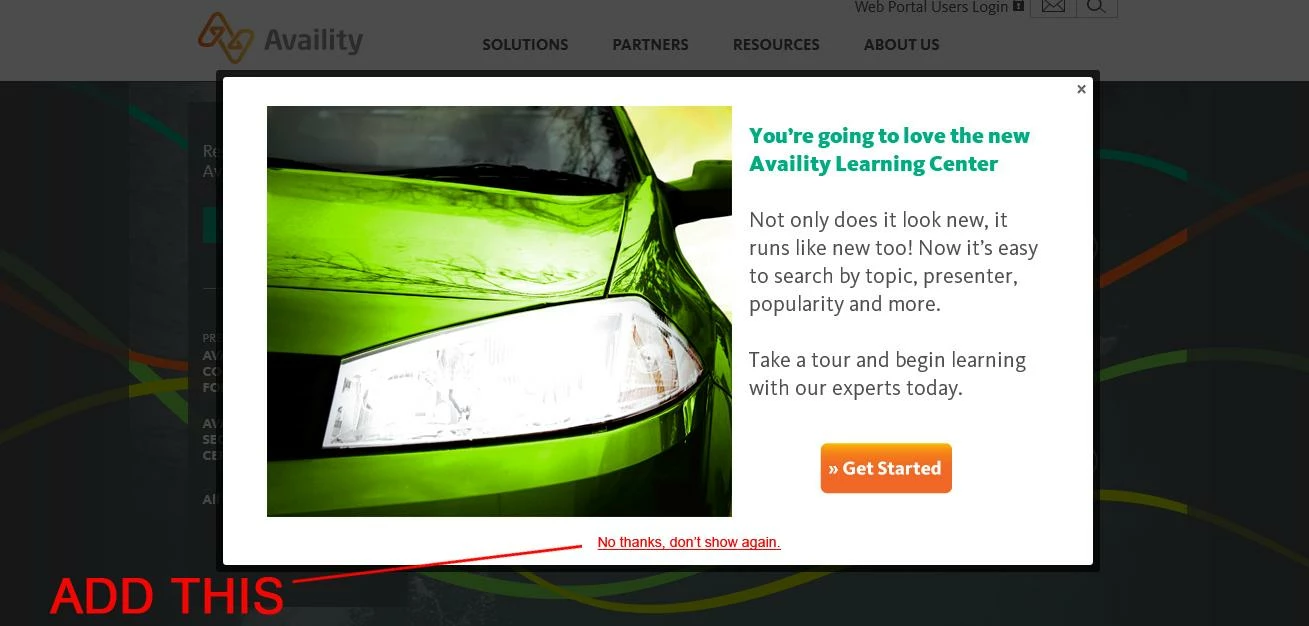
Users do not have the option to discontiniue seeing the modal if they return after their session expires (30 minutes). We have over 1.4 million page views a month as our users access our site multiple times a day. This makes running RTP campaigns annoying from a users perspective if they cannot be coookied so they can opt out to not see the modal several times a day.
This is a standard best practice when serving popups and right now we only run campaigns once a week and manually have to turn them off.
I would like to mention that aside from this basic functionality flaw the tool is great and I would recommend it to anyone but not without adding the feature I have mentioned.