Installed Marketo Sales Insight into SFDC - but the fields are missing at the Account and Opp level. | Community
Skip to main content
October 8, 2014
Solved

Installed Marketo Sales Insight into SFDC - but the fields are missing at the Account and Opp level.

  • October 8, 2014
  • 3 replies
  • 2834 views
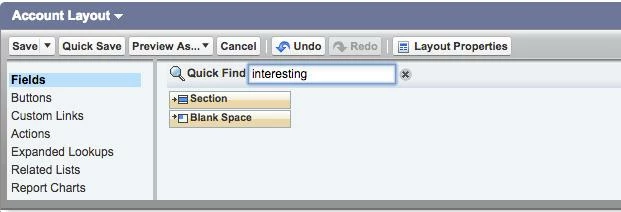
Here's the account layout. I don't see the fields I'm supposed to add which I've pasted below.


Priority (or Engagement)

Relative Score Value

Urgency Value

Last Interesting Moment Date

Last Interesting Moment Desc

Last Interesting Moment Source

Last Interesting Moment Type


This post is no longer active and is closed to new replies. Need help? Start a new post to ask your question.
Best answer by Grant_Booth
Right - these are fields on the lead and contact objects, so you can't add them to an account or opportunity layout. In fact, you don't *have* to add them to the page layout of the lead and contact objects either - Sales Insight will still work if you don't. We just recommend that you do because it can help you interpret why a particular lead is receiving more stars or flames.

3 replies

October 8, 2014
Okay. On the set up instructions it says to "repeat these steps for account, opp" so thought adding those fields appled to those objects too. Thanks for clearing that up.
New Participant
September 4, 2020

Having the same issue on my end. The MSI package created some fields in Salesforce, but I had to manually create: 

  • Priority (Lead)
  • Relative Urgency (Lead)
  • Priority (Contact)
  • Relative Score (Contact)
  • Relative Urgency (Contact)

I'm still getting an error saying that they are not configured. Strangely, the Relative Urgency field is a managed field by MSI, so I can't edit it. The rest are not. Any ideas? 


Related rant, how is this documentation so bad? No mention of the type of field to create in SFDC or length? 😠


Did 

Grant_Booth
Grant_BoothAccepted solution
New Participant
October 8, 2014
Right - these are fields on the lead and contact objects, so you can't add them to an account or opportunity layout. In fact, you don't *have* to add them to the page layout of the lead and contact objects either - Sales Insight will still work if you don't. We just recommend that you do because it can help you interpret why a particular lead is receiving more stars or flames.
Grant_Booth
New Participant
June 3, 2015

A quick clarification to my comment - it's not required to have these fields on the page layout of the lead and contact objects in *Enterprise Edition* of Salesforce. It IS required for Professional Edition, since in Professional Edition the sync user's access to fields is determined by page layout rather than by profiles.

Josh_Hill13
New Participant
October 8, 2014
These only appear on the Lead and Contact records.