
Is it possible to change the position of the progressive profiling fields? | Community
Skip to main content
Cecile_Maindron
New Participant
January 20, 2016
Solved

Is it possible to change the position of the progressive profiling fields?

  • January 20, 2016
  • 5 replies
  • 3925 views

Hello,

I have currently the following non-progressive form:
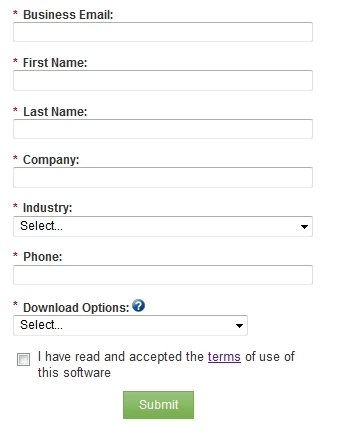
I would like to make the First Name / Last Name / Industry / Phone fields as progressive.
I want to keep the Business Email / Company / Download Options / T&Cs.

I know how to make fields progressive. My question is: is it possible to change the position of the progressive fields?

Currently all the always show fields are showing up first and all the progressive fields are showing up second.
As a result, I have Business Email, Company, Download Options, T&Cs and then eventually First Name, Last Name etc... this really looks spooky.
What I would like is keep the exact same order as above but only display the progressive fields where data is not already in Marketo.

Does that make sense? Is that possible?

Cécile @ Talend

This post is no longer active and is closed to new replies. Need help? Start a new post to ask your question.
Best answer by Grégoire_Miche2

Bonjour Cécile,

This is not possible directly in Marketo.

May be some CSS or using the forms 2.0 API may enable this.

-Grégoire

5 replies

January 20, 2016

As was stated above, we had to have the landing page with custom css dictate where the field were placed.

It does spook spooky when it is in the Marketo default! Hopefully you have someone on your team that can help you with the css.

SanfordWhiteman
New Participant
January 20, 2016

If you send a link to your form with all fields revealed (i.e. ProgPro set to 4 max fields) I'll tell you how to modify the order.

SanfordWhiteman
New Participant
January 20, 2016

Yeah, it's really easy (once you consider Forms 2.0 output to not be static but merely a starting point you can manipulate at ready time).  See this thread: Re: Progressive profiling fields above required fields?

Josh_Hill13
New Participant
January 20, 2016

Yes, this is the default behavior.

Yes, it is possible to do this with javascript. I had Marketo Support help once, but it's better to get someone like Sanford to help.

Grégoire_Miche2
Grégoire_Miche2Accepted solution
New Participant
January 20, 2016

Bonjour Cécile,

This is not possible directly in Marketo.

May be some CSS or using the forms 2.0 API may enable this.

-Grégoire