I tend to agree with Jay that this may fit multiple independent Checkbox fields, visually grouped -- i.e. not a single Checkboxes field -- just as well.
Still, <select multiple> is underutilized and I've always been fond of it. You can use some generic JS to spread a multi-select's selections into individual Booleans. You do need one placeholder field, but it can be a Boolean or Integer itself (to conserve space in the db) as it just needs to appear on the form and is neither used nor processed on the server. (No Smart Campaigns are used.)
For example, with this list of values...
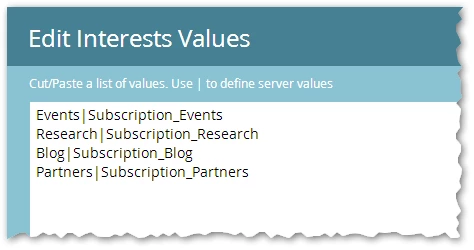
... you can turn these selections...

... into these individual Boolean values on submit...
- Subscription_Events = true
- Subscription_Research = false
- Subscription_Blog = true
- Subscription_Partners = false
... using this Forms 2.0 JS:
MktoForms2.whenReady(function(form) {
var userConfig = {
multiSelectToBool: {
fields: ["testTextArea01"]
}
};
/* --- No need to touch below this line! --- */
var arrayify = getSelection.call.bind([].slice),
formEl = form.getFormElem()[0];
form.onSubmit(function(form) {
var currentValues = form.getValues();
userConfig.multiSelectToBool.fields
.map(function(fieldName) {
return formEl.querySelector("select[multiple][name='" + fieldName + "']");
})
.forEach(function(fieldEl) {
var mktoFields = arrayify(fieldEl.options)
.reduce(function(acc, nextOption) {
if( currentValues[fieldEl.name] && currentValues[fieldEl.name].indexOf(nextOption.value) != -1 ) {
acc[nextOption.value] = "yes";
} else {
acc[nextOption.value] = "no";
}
return acc;
}, {});
form.addHiddenFields(mktoFields);
});
});
});
The only line to modify is the fields array, which is a list of the placeholder fields that you want to turn into Booleans. In this case I've used a dummy Textarea, testTextArea01.
Demo: MktoForms2 :: <select multiple> to individual Booleans
