
Is there a way to define "more than x days" in Date of Activity of a Smart List? | Community
Skip to main content
Rita_Gaspar
New Participant
May 6, 2021
Solved

Is there a way to define "more than x days" in Date of Activity of a Smart List?

  • May 6, 2021
  • 1 reply
  • 2063 views

Hello,


I work for a corporate bank and we are using Marketo to communicate with users of our digital banking platform.

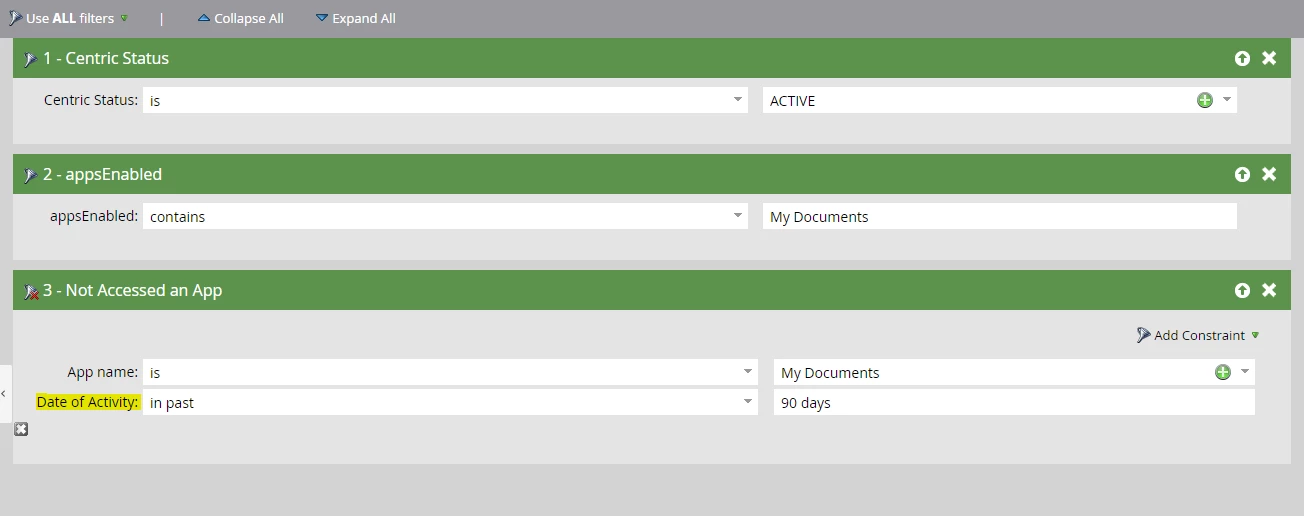
I'm trying to set-up a campaign that would send an automatic email as soon as a user reaches 90 days without using one of the apps of our platform. However, none of the "Date of Activity" options allows me to do it. I don't want to define a specific date, I want to say "for more than 90 days".


Does anyone had the same problem? How did you solve it?


Thank you,

Rita
 

This post is no longer active and is closed to new replies. Need help? Start a new post to ask your question.
Best answer by Michael_Florin-2

Yes, this is a problem.


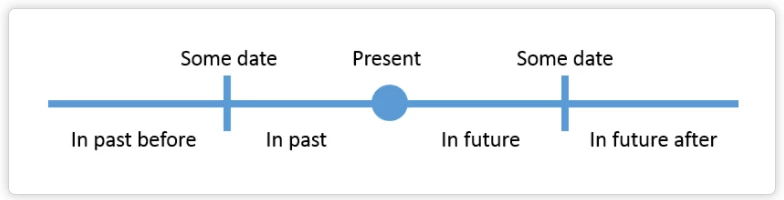
So I understand you want to send an email to someone whose last activity date is exactly 90 days in the past. Usually you would achieve that be a combination of date filters like


Date is "In past 91 days" AND

Date is "In past before 90 days"


See: https://docs.marketo.com/display/public/DOCS/Smart+List+Filter+Operators+Glossary#SmartListFilterOperatorsGlossary-DateFields


Although clunky, that works for date fields. But it does not work for activity filters. I had an exchange with Marketo Support, and that's what they told me. "The filter is an activity filter and the "In Past Before" constraint is only for Date field filters."

So I think your workaround should account for that. Create a date field in Marketo "Last App Usage" and populate it daily based on your activity criteria. Then use that field to build your Smart List.

1 reply

Michael_Florin-2
Michael_Florin-2Accepted solution
New Participant
May 6, 2021

Yes, this is a problem.


So I understand you want to send an email to someone whose last activity date is exactly 90 days in the past. Usually you would achieve that be a combination of date filters like


Date is "In past 91 days" AND

Date is "In past before 90 days"


See: https://docs.marketo.com/display/public/DOCS/Smart+List+Filter+Operators+Glossary#SmartListFilterOperatorsGlossary-DateFields


Although clunky, that works for date fields. But it does not work for activity filters. I had an exchange with Marketo Support, and that's what they told me. "The filter is an activity filter and the "In Past Before" constraint is only for Date field filters."

So I think your workaround should account for that. Create a date field in Marketo "Last App Usage" and populate it daily based on your activity criteria. Then use that field to build your Smart List.