Is there a way to edit the hyperlink color of the calendar token in Marketo? | Community
Skip to main content
February 9, 2015
Solved

Is there a way to edit the hyperlink color of the calendar token in Marketo?

  • February 9, 2015
  • 3 replies
  • 4836 views
Is there a way to edit the hyperlink color of the calendar token in Marketo?
This post is no longer active and is closed to new replies. Need help? Start a new post to ask your question.
Best answer by
Hi Danielle

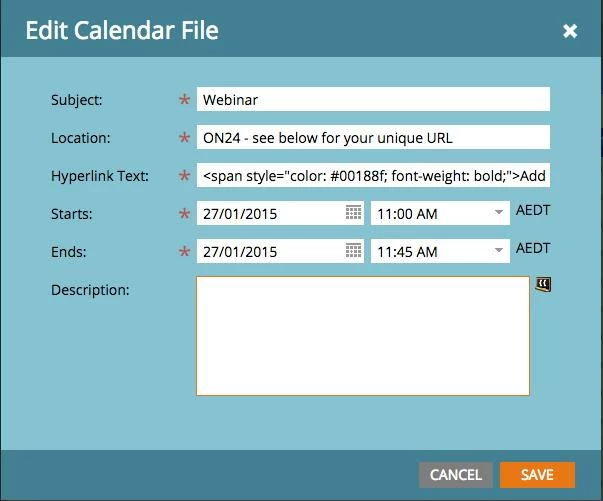
You can change the colour by adding the style into the hyperlink section of token, as below. Just change the hex colour in the text below to the one you want to use.

<span style="color: #ffffff; font-weight: bold;">Add to Calendar</span>

Hope that helps!
Bronwen

3 replies

October 23, 2015

Anyone figure out how to get rid of the underline? Since it's a <span> tag, text-decoration: none; isn't working with the solution Bronwen offered.

February 12, 2015
Thank you so much! This was very helpful. One more question: Is there a way to change the color of the underline? Or, remove the underline since this appears as a link. 

I was able to change the color; however, the underline still appears as the generic blue. 
Veronica_Holme4
New Participant
June 5, 2015

Hi Danielle - there's a good chance that this link colour is being driven centrally from the email CSS - you will need to adjust the link colour for the entire email there.

New Participant
June 17, 2015

Hi! I was able to change the color of the text as instructed above, but the underline is still there even after I added text-decoration = none. Any thoughts on how to eliminate the underline?

Accepted solution
February 10, 2015
Hi Danielle

You can change the colour by adding the style into the hyperlink section of token, as below. Just change the hex colour in the text below to the one you want to use.

<span style="color: #ffffff; font-weight: bold;">Add to Calendar</span>

Hope that helps!
Bronwen