Is this Lead Score Change Flow correct? | Community
Skip to main content
Danielle_Wong
Community Manager
May 14, 2019
Solved

Is this Lead Score Change Flow correct?

  • May 14, 2019
  • 2 replies
  • 3104 views

I'm looking at some flows that were set up in the past (not by me). I'm trying to understand how it was set up. 

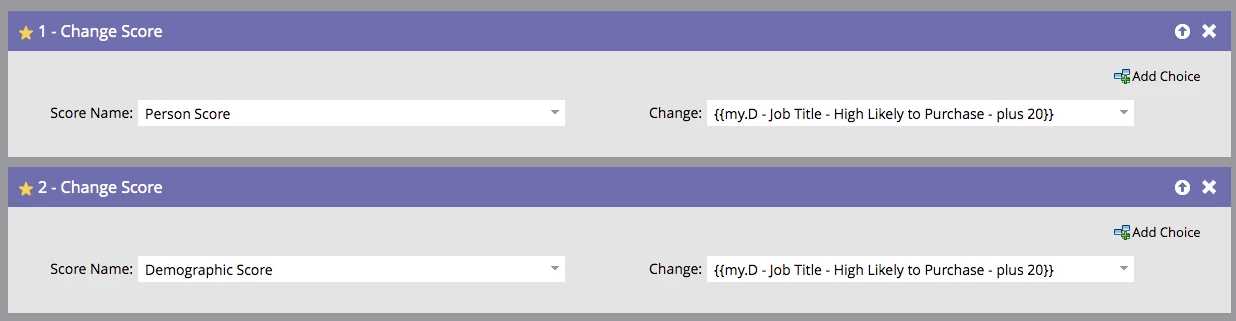
We have flows that looks like the below

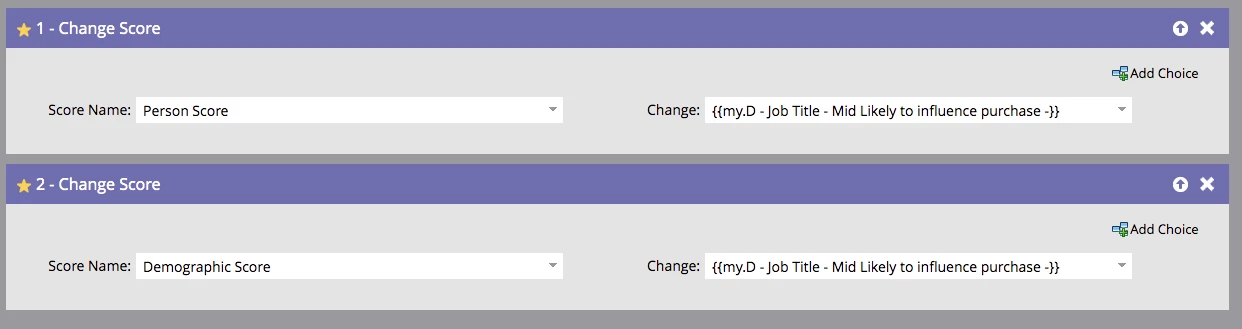
and

Are these normal ways to set it up? In some documentation, I just see +30 or -30 in the Change field.

Thanks

Danielle

This post is no longer active and is closed to new replies. Need help? Start a new post to ask your question.
Best answer by karanhari-1

 Hi @Danielle Chan, 

The answer to your question would be - Yes! The lead scoring flow set up in the above snapshots does look correct. 

 - You can directly update the scores in the flow step like - +30, -30 etc, or you can use score tokens, defined at a program or a folder level (You can read more about My tokens here) and reference them in the flow step - as shown in the above snapshot. The second method (Using tokens) is more scalable and recommended. For example, if you wanted to change a particular score at a later point, all you would have to do is to update the score at a token level, rather than updating it in all individual flow steps where the particular score might have been used. You can also go through the Marketo product docs for tokens - Understanding My Tokens in a Program

Hope that helps!

Best Always,

Karan Hari

2 replies

Amit_Jain
Community Manager
May 14, 2019

Hi @Danielle Chan‌,

People usually face challenges with this kind of scoring setup. Which is they double count the demographic score (assuming you have "change data value trigger on Job title field and smart campaign qualification allows one lead to run multiple times through the smart campaign). Let's say John who is a prospective client and his current role in his organization is "Manager", which is "Mid likely Influence" title and you assigned let's say 10 score to John for this. After 2 months, John promoted to let's say "Vice President", which is a "high likely Influence" title. For this title, you assign 30 score.


As a result, John now will 40 demographic score just because of the Job title but according to your setup it should be just 30. And same case can happen with multiple fields which will exponentially increase the "Person Score". Not sure if this applicable to your setup, but would highly recommend you to check this scenario once.


Feel free to let me know if you need further help on this.


Regards,
Amit

Danielle_Wong
Community Manager
May 15, 2019

Hi Amit,

Thank you for providing that scenario. We are currently evaluating our lead scoring triggers, and will give this some more thought!

Danielle

karanhari-1Accepted solution
New Participant
May 14, 2019

 Hi @Danielle Chan, 

The answer to your question would be - Yes! The lead scoring flow set up in the above snapshots does look correct. 

 - You can directly update the scores in the flow step like - +30, -30 etc, or you can use score tokens, defined at a program or a folder level (You can read more about My tokens here) and reference them in the flow step - as shown in the above snapshot. The second method (Using tokens) is more scalable and recommended. For example, if you wanted to change a particular score at a later point, all you would have to do is to update the score at a token level, rather than updating it in all individual flow steps where the particular score might have been used. You can also go through the Marketo product docs for tokens - Understanding My Tokens in a Program

Hope that helps!

Best Always,

Karan Hari
Danielle_Wong
Community Manager
May 14, 2019

Thanks for all this helpful information, Karan. This makes sense to me now!

Danielle

New Participant
May 14, 2019

You are most welcome @Danielle Chan 

Best Always,

Karan Hari