Is this Possible?! - Email Scanner Logic Diagram | Community
Skip to main content
New Participant
September 1, 2022
Question

Is this Possible?! - Email Scanner Logic Diagram

  • September 1, 2022
  • 1 reply
  • 2865 views

We are trying to give our sales team accurate lists of leads... We have been really struggling with email scanners.


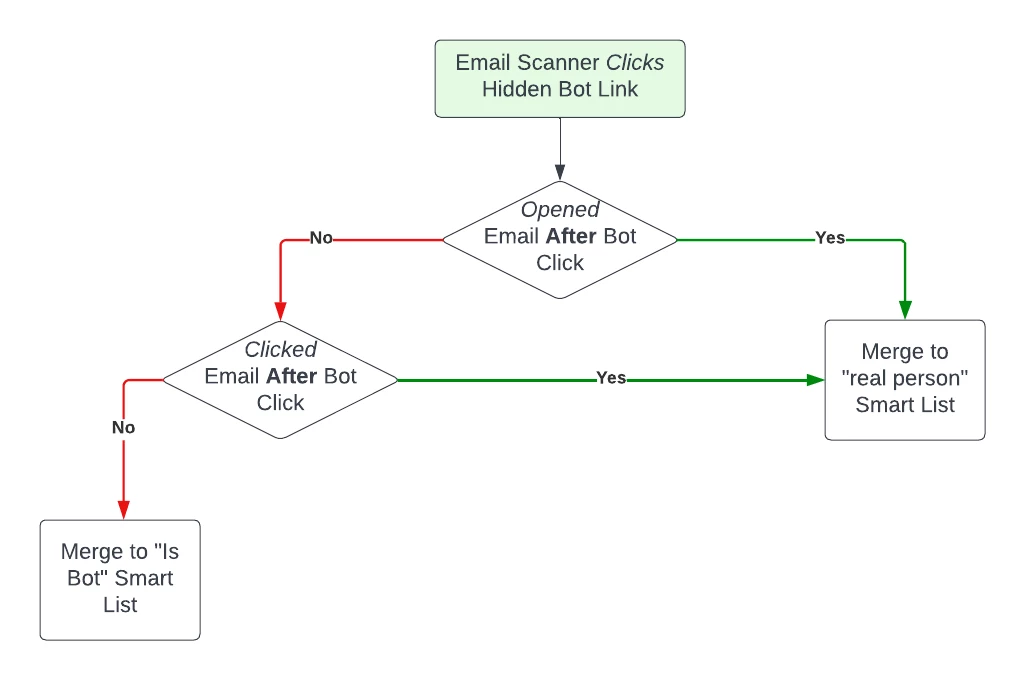
This is the logic that I want to go for but I am not entirely sure how to set it up as I don't see any options for click time stamps in Marketo.


If there is someone who could explain a way to apply this logic with either using Smart Campaigns or even creating changing tags applied to a contact it would help. Thank you - Jacob
 

This post is no longer active and is closed to new replies. Need help? Start a new post to ask your question.

1 reply

Katja_Keesom
Community Manager
September 2, 2022

Are you saying that you would treat the entire lead record as a bot based on this logic? Not sure I follow that logic, as a lead can have a mix of human and bot activity. I think the key would be with identifying which activities come from a mail scanner rather than excluding a lead based on a single mail scanner activity.

Marketo of course now provides several options to identify bot activities individually and as I understand more are on their way. Clicking a honey pot link is not the only way to do so. Of course this is not and will probably never be 100% airtight, but between adding your own honeypot process and activating the Marketo options for identifying bot activity you will be able to have your campaigns respond to human activity only to a better degree.

SanfordWhiteman
New Participant
September 2, 2022

One of Marketo’s own tactics involves a decoy link/honeypot so it doesn’t make sense to do that yourself.


Really I don’t think people should be trying cobble things together anymore, turn on Bot Detection and then try to get the team to add/perfect features is the way to go.

Katja_Keesom
Community Manager
September 2, 2022

I am not sure whether that one was actually implemented. I do see it in the overview in admin, but so far have not seen any bot activities captured there across the instances I work with and I also do not see any setting to activate it.