
Issue Adding Web Page Information to Interesting Moment | Community
Skip to main content
michellechopin
Community Manager
November 27, 2020
Solved

Issue Adding Web Page Information to Interesting Moment

  • November 27, 2020
  • 1 reply
  • 6155 views

I've set up Interesting Moments to run on every form fill on our website and want to include the web page that the form is filled out on (we use the same form in multiple places so I'm trying to give Sales a wider picture of the lead's key activities).

I updated the IM to be as follows:
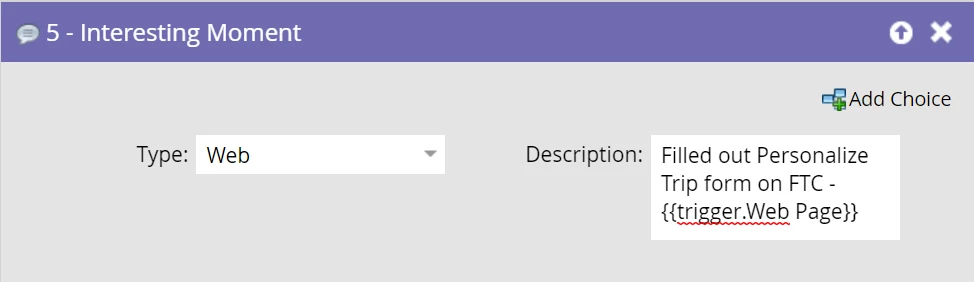
However, after filling out the form to test, this is what shows in Marketo - it's not populating the Web Page:

My questions:

  1. Is this the correct trigger I should be using to display the Page URL? I tried {{trigger.Name}} before but it populated the name of the form (assuming because that's the trigger for the IM)
  2. This particular form is a pop up once the visitor clicks on the page CTA - would that prevent the web page trigger from working as intended?

Any help/insight is much appreciated and thanks in advance  😀


This post is no longer active and is closed to new replies. Need help? Start a new post to ask your question.
Best answer by SanfordWhiteman

Use {{Trigger.Referrer}}.

1 reply

SanfordWhiteman
SanfordWhitemanAccepted solution
New Participant
November 27, 2020

Use {{Trigger.Referrer}}.

michellechopin
Community Manager
November 30, 2020

Thanks for this @sanfordwhiteman! I hadn't noticed that the Marketo resource section about this scrolled to the right!


I updated the IM with that token and got this error (note: there's only this token in the IM):


This might be a silly question but do I have to create this Trigger token in each campaign? I assumed that this was a general token available throughout the instance vs a custom one. If my assumption is correct, do you have any insight on why I got that error?


Thanks again!

SanfordWhiteman
New Participant
November 30, 2020

Is the trigger here Filled Out Form, or are you chaining from another SC using Request Campaign or something like that?


(And no, you certainly don't need to create the built-in tokens.)