
Issue found (and resolved) with CSS comments in Border tag in Outlook 365 on MacOS 12 and 13
Today (August 28, 2023) I noticed borders on my buttons stopped rendering in Office365 on MacOS 12 and MacOS 13. They were working fine everywhere else. It appears be related to Microsoft's last update to Office365 Outlook for MacOS on August 22, 2023.
It's not a completely generalised issue however. The use case is pretty specific.
This is a situation where I use a drop down to select colors. Rather than visible color codes, I use my trick of putting a CSS comment in front of the attribute to give a human readable value to select (i.e as follows).
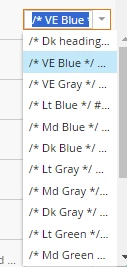
When selected, the actual value is /* VE Blue */ #17468F
The unrendered CSS looks like this:
border:2px solid ${ctaBorderColor};
which then renders to:
border:2px solid /* VE Blue */ #17468F;
This works on all other platforms, and has just stopped working in Office 365 on MacOS 12 and MacOS 13. Fortunately, the fix was simple. Convert your code to do borders longhand as follows:
border-width:2px; border-style:solid; border-color:${ctaBorderColor};
which renders to:
border-width:2px; border-style:solid; border-color:/* VE Blue */ #17468F;
Am I happy about this? Of course not. However, I am at least happy I found the issue early and was able to resolve.
I have tested this across Email On Acid, and also on as many devices/combinations as I can. This seems to be a solid fix.
So, if you've ever used my trick to give human readable attributes in front of CSS values, you can expect it to break unless you've already used the longhand approach or unless you convert your code to use the longhand approach.