Issue splitting string with regex in velocity | Community
Skip to main content
Victor_Herrero
New Participant
March 8, 2021
Solved

Issue splitting string with regex in velocity

  • March 8, 2021
  • 1 reply
  • 5511 views

Hi! 

I have been having issues trying to split a series of strings in one line by different delimiters. 

This is the code I am using: 


#set ($latestMeetingTimeFromArray = $latestMeetingTimeFrom.split("\s|[:\.]")) #set ($latestMeetingTimeFromArrayString = $convert.toString($latestMeetingTimeFromArray)) array : $latestMeetingTimeFromArrayString <br>


(I'm printing out the array for debugging)

$latestMeetingTimeFrom can have values like the following: 


12:00 PM 1:30 AM 11.00 PM


My aim is to store hours minutes and the meridiem in three separate variables, and as you can see, the delimiters are colon, dot and space. 

I have tried all sorts of supposedly valid regex expressions to indicate all possible delimiters (with character set, three individual chars in OR, one char set with all three... ) and I have even tried passing a limiter of 0 and 3, but still the array ends up containing only one character: the hours value. 

Example output:
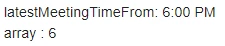
The only way I have managed to get this to work is by replacing all delimiters with the same one (i.e. a space), then simplyfying the regex to just that one character. 

Additionally, those three lines of code already break the email when there is a "." separating hours and minutes. Here is the error

 

Any idea why this is happening? 

This post is no longer active and is closed to new replies. Need help? Start a new post to ask your question.
Best answer by SanfordWhiteman

I don't understand why you'd be converting the Array back into a String, if you want individual variables?


In any case you should be using the built-in DateTime functions, as this is a DateTime parsing exercise, not a proprietary format:

#set( $meetingDT = $convert.toCalendar($convert.parseDate($latestMeetingTimeFrom,"h:mm a") )) #set( $hour = $date.format( $meetingDT,"h") ) #set( $minute = $date.format( $meetingDT,"mm") ) #set( $meridiem = $date.format( $meetingDT,"a") )


1 reply

SanfordWhiteman
SanfordWhitemanAccepted solution
New Participant
March 8, 2021

I don't understand why you'd be converting the Array back into a String, if you want individual variables?


In any case you should be using the built-in DateTime functions, as this is a DateTime parsing exercise, not a proprietary format:

#set( $meetingDT = $convert.toCalendar($convert.parseDate($latestMeetingTimeFrom,"h:mm a") )) #set( $hour = $date.format( $meetingDT,"h") ) #set( $minute = $date.format( $meetingDT,"mm") ) #set( $meridiem = $date.format( $meetingDT,"a") )


Victor_Herrero
New Participant
March 16, 2021

I was converting the array back into a string only for debugging. I wanted to see if it was forming correctly. 

Your suggestion to use built-in time functions is definitely more elegant than me attempting to re-invent the wheel and I have been able to successfully implement it to create an "Add to Google" link. 


That aside, a problem we have is with data being incorrect. There are some records on database that display "." instead of ":" to separate hours from minutes and I still have had replace those. 


What I was trying to do with the split method was to avoid chaining replace methods by leveraging one regular expression. 

Split seems to expect a regular expression instead of a single character, so I wanted to bundle all possible wrong characters into on eexpression. But I have not been able to split by several delimiters, even if my regular expression seemingly is able to correctly identify all delimiters I needed (".",":" and " "). When attempting to split by it, the resulting array only contained the first element. 


I may be wrong but it seems like you can't use several delimiters in one expression to split once (so basically use "|" inside your expression). 

SanfordWhiteman
New Participant
March 16, 2021

I may be wrong but it seems like you can't use several delimiters in one expression to split once (so basically use "|" inside your expression). 


You sure can:

#set( $latestMeetingTimeFrom = "a;b:c.d" ) #set( $latestMeetingTimeFromArray = $latestMeetingTimeFrom.split("[;:.]")) #foreach( $itm in $latestMeetingTimeFromArray ) ${itm} #end