Issue with emails when copying from HTML to text | Community
Skip to main content
December 17, 2015
Solved

Issue with emails when copying from HTML to text

  • December 17, 2015
  • 2 replies
  • 3641 views

I'm having an issue when I copy from HTML to text that just started 2 weeks ago or so. When I copy from HTML to text (vs. typing the plain text), the spacing of the fields increases dramatically. Has anyone else experienced this issue when copying from HTML? Any ideas? I'm including screenshots of before and after. Again, the issue doesn't arise if I type the plain text into the text version of the email.
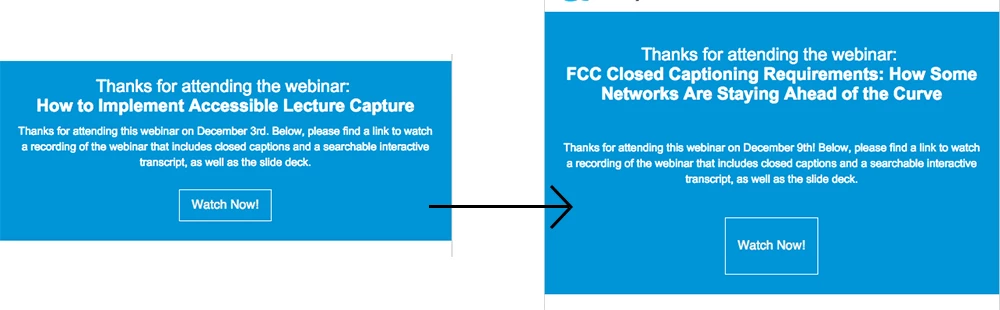

This post is no longer active and is closed to new replies. Need help? Start a new post to ask your question.
Best answer by Justin_Cooperm2

Yes, my guess is that Lily wants the root block for text in the Email Editor to be set to "none". It looks like the fact the <p> will be added around the contents of her text is causing this spacing issues.

2 replies

Justin_Cooperm2
Justin_Cooperm2Accepted solution
New Participant
December 18, 2015

Yes, my guess is that Lily wants the root block for text in the Email Editor to be set to "none". It looks like the fact the <p> will be added around the contents of her text is causing this spacing issues.

December 18, 2015

Thanks, Justin, that fixed it! I had read that setting the root block to "none" was generally not a good idea, so I didn't think to try it.

Grégoire_Miche2
New Participant
December 17, 2015

Hi Lily,

Go to admin -> email -> edit editor settings. What do you have in the Root Block Elements section?

-Greg

December 17, 2015

Hi Greg,

The email/snippet editor is <p> and the landing page editor is <div>.

Grégoire_Miche2
New Participant
December 17, 2015

Hi Lily,

OK, this is correct.

Does that show also on the email (send sample) or landing page (view approved page)?

If so, run a test :

Do the same operation, but copy and paste the HTML code into a separate text document before and after clicking the "copy HTML to Text" button. Compare the 2 and look if the code has changed. If so, log a support ticket, it should not happen.

-Greg