Issue with Select list, visibility rules, and having multiple values | Community
Skip to main content
September 14, 2014
Question

Issue with Select list, visibility rules, and having multiple values

  • September 14, 2014
  • 8 replies
  • 4439 views
Hello,

I am having an issue with a form that we need to lchange the default value of "Select..." on certian Countries. 

Here is the senario:

We are doing a simple country visibility rule. when the user selects their country (United States, Canada) only that countries states/provinces display.

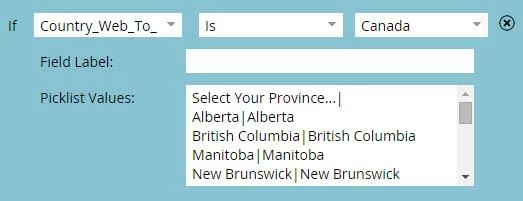
I need to update the label "Select..." that appears in the select box for certian countries. Unfortunetly it does not work.

What I have been able to figure out thus far is this:

You have your master picklist that you put together prior to choosing your visibility rules. 



In this section you can change the "Select..." to what ever you want.

Then you go into the visbility rules and change the vaule from "Select..." to lets say "Select Your Province..." for Canada. When you fill out the form and select Canada, a blank field shows up as it does not match the default which was chosen in the master picklist vaules "Select..."


Here is  an example of three forms on it. the forst form is standard, second form changes the default text, and the third is left default except when you choose Canada. 


Any help would be very helpful. 

-AF
This post is no longer active and is closed to new replies. Need help? Start a new post to ask your question.

8 replies

Max_Maurier
New Participant
September 11, 2021

I ran into this issue today and found a foolproof fix!

You need to change the default value BEFORE you set any visibility rules. If you change the default value AFTER, you will run into this issue every time, but if you do it before, it will work perfectly.

I hope this helps, and this bug shouldn't exist in the first place, but it completely solved the issue for me.

July 6, 2015

This is a bug and I have been trying to find a solution. Inline text gets erased somehow when there are visibility rules. I cant even set the text with jQuery.

Did you ever find a workaround?

Update - this is working for my simple need:

I configured visibility rules to default to show state field and make it hide if any country is selected besides US

the first option has to be "state:" so it shows up

you could add a listener and switch which option has the selected="selected" attribute based on which country, but at that point you might as well just write your own visibility logic.

timeout is because I am embedding the marketo form

<script>

setTimeout(function(){

jQuery("#State option:first").attr('selected','selected');

      }, 6000);

</script>

SanfordWhiteman
New Participant
July 6, 2015

Hmm, you should never use timeouts to (attempt to) predict call order in an asynchronous environment.  It's bad programming practice and destined to fail.

Forms 2.0 includes a robust event API that's designed to eliminate the "likely call order" antipattern and race conditions.  If you want to do something after an embedded form is ready, just do it in an onReady listener (the 4th argument to MktoForms2.loadForm).  The form element is guaranteed to be in the DOM at the time it is called.

P.S. No reason to use jQuery to set the selected index: the Forms 2.0 method form.setValues() exists for this purpose.

SanfordWhiteman
New Participant
July 7, 2015

By the way, while there are many ways to skin this cat, one simple way is to add all your states/provinces/cantons to the same list, prefixing each with the country name:

This list becomes the template from which you draw or discard elements. Working with SELECTs is much easier when you maintain an out-of-band template element like this.

Then use some boilerplate to populate the live SELECT from the template as needed: CodePen - MktoForms2 :: Dependent Country-State/Province

September 15, 2014
I would agree with you as well. Unfortunately the way our forms are designed we remove the field labels. All identifying info is located in the field not next to it. 
 
I am thinking Marketo designed it this way, which is unfortunate.
 
September 15, 2014
How about this: leave the Select field as is and change the field name to State or Province so it looks like this:


or


or


I'm thinking this is why they put in the ability to change the field name and it still seems professional to me AND it is personalized/localized to that region which really shows you bumped the lamp .

Hope this solves your problem.
Rodney
September 15, 2014
This is a global form. I am only using province as an example. This is what it would need to look like if I did this suggestion. 

"Select Your State/Province/Region/Canton/Emirate/Country"

I do not think that is very professional.

I am confused why this is even an issue. Am I the first person who has used Marketo that needs this functionality? Is this truly an issue with Marketo??????
Josh_Hill13
New Participant
September 15, 2014
Why not just use "Select State/Province" ?
September 15, 2014
Sadly this does not fix the problem. 
New Participant
September 14, 2014
Hi Anthony,

Have you tried adding "Select your Province" just before the Canadian states in your master? I've found that anything that is in my master list will show up when I then specify visibility rules.

Natali