
Jan. 2013 release : question about the Enhanced Field Display Names | Community
Skip to main content
Cecile_Maindron
New Participant
January 24, 2013
Solved

Jan. 2013 release : question about the Enhanced Field Display Names

  • January 24, 2013
  • 7 replies
  • 2059 views
Hi,

I have a question related to the new release. One of the new features is:

Enhanced Field Display Names
Field Display Names can display text in different languages.

When I click on link, the page displayed doesn't seem to be the right one. It's indeed about custom fields, but content looks "old" (I'm pretty sure I have read this page a while ago when I wanted to create custom fields) and there is nothing about languages....

Is it just me?

Cécile @ Talend
This post is no longer active and is closed to new replies. Need help? Start a new post to ask your question.
Best answer by
Cécile, when I click the link at the top of the Release Notes help article (https://community.marketo.com/MarketoArticle?id=kA050000000L8la#6), it takes me to the section about that topic in the help article.  I don't see any other link.  Which link are you clicking?

7 replies

Edward_Masson
New Participant
January 24, 2013
Thanks Ei-Mang, my apologies.
Correct! What threw me was the 'in different languges' bit.
 
January 24, 2013
Hi Edward,

If you click on the article in Cecile's original post, please scroll down to #4 for the new information that was added for the Jan2013 release


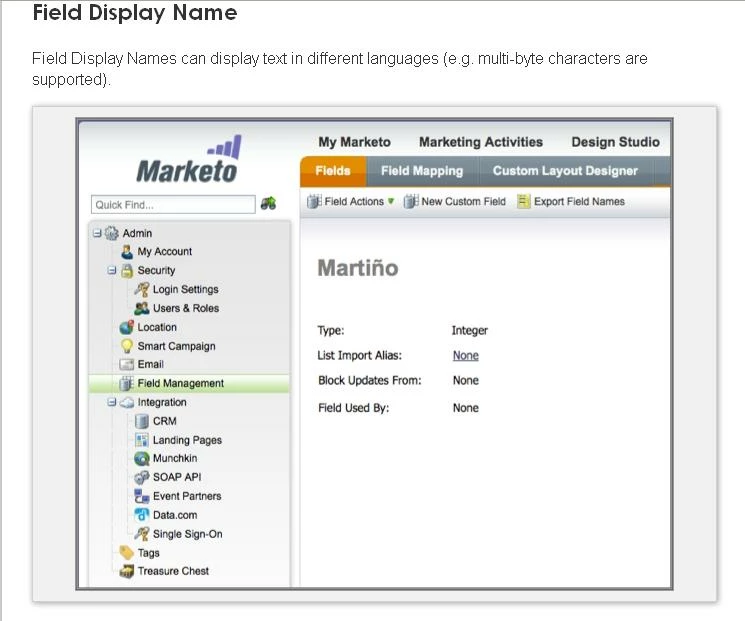
Previously, field display names could only contain the letters a-z, numbers or a dash. So, this screenshot shows how the symbol "&" can now be included. Given that we referenced support for different languages, I can see why this causing so much confusion. I'll work to this article updated to be more clear.

Thanks for the feedback, everyone!
Ei-Mang
Edward_Masson
New Participant
January 24, 2013
I thought I was missing something here also and could not find any mention of a language enhancement.
So where is the article?
This string is marked solved but its not!
January 24, 2013
Hi Cécile,

Sorry for any confusion -- and thank you, Elliott, for jumping in to provide the clarification.

Thanks, Ei-Mang
January 24, 2013
Good catch!-

Marketo should change the link to the one I noted above or add this information to the help article that it is currently linked to.
Cecile_Maindron
New Participant
January 24, 2013
I was referring to following page (see screenshot) where Display Name points to
https://community.marketo.com/MarketoArticle?id=kA050000000KypG

but Thanks, your screenshot gives me explanation needed.

Accepted solution
January 24, 2013
Cécile, when I click the link at the top of the Release Notes help article (https://community.marketo.com/MarketoArticle?id=kA050000000L8la#6), it takes me to the section about that topic in the help article.  I don't see any other link.  Which link are you clicking?