Labels within Picklist values | Community
Skip to main content
September 8, 2016
Solved

Labels within Picklist values

  • September 8, 2016
  • 1 reply
  • 2771 views

Trying to use a Marketo form that would end up with non-selectable labels to help organize a longer picklist.

Functionality is similar to: http://www.w3schools.com/tags/tryit.asp?filename=tryhtml_optgroup

I did try to just put in a label like "DISPLAY|" but it still allows that to be selected.

Any advice is very much appreciated. Unfortunately (but not surprisingly), this was a request for a program that has to launch Monday so not a lot of time and I have a feeling this will end up being a custom form.

Thank you.

This post is no longer active and is closed to new replies. Need help? Start a new post to ask your question.
Best answer by SanfordWhiteman

You can't do this with the editor alone, but with the editor + a little JavaScript it's easy.

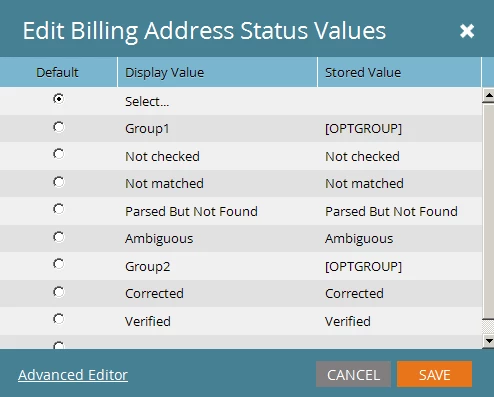
Set up your options with the "magic word" [OPTGROUP] where you want to start a group:

Then this JS:

MktoForms2.whenReady(function(form) {

  var formEl = form.getFormElem()[0],

    _forEach = Array.prototype.forEach,

    currentOg;

  _forEach.call(formEl.querySelectorAll('SELECT'), function(selectEl) {

    _forEach.call(selectEl.querySelectorAll('OPTION'), function(o, idx) {

      if (o.value == '[OPTGROUP]') {

        (currentOg = document.createElement('OPTGROUP'), currentOg).label = o.textContent;

        selectEl.appendChild(currentOg), selectEl.removeChild(o);

      } else {

        if (currentOg) currentOg.appendChild(o);

      }

    });

  });

});

1 reply

Grégoire_Miche2
New Participant
September 8, 2016

Set this in the standard picklist editor, not in the advanced one.

-Greg

September 8, 2016

So this is likely user error. When I only fill in the Display value on the standard editor, it is auto-populating the Stored Value with the same text.

What am I missing?

SanfordWhiteman
SanfordWhitemanAccepted solution
New Participant
September 9, 2016

You can't do this with the editor alone, but with the editor + a little JavaScript it's easy.

Set up your options with the "magic word" [OPTGROUP] where you want to start a group:

Then this JS:

MktoForms2.whenReady(function(form) {

  var formEl = form.getFormElem()[0],

    _forEach = Array.prototype.forEach,

    currentOg;

  _forEach.call(formEl.querySelectorAll('SELECT'), function(selectEl) {

    _forEach.call(selectEl.querySelectorAll('OPTION'), function(o, idx) {

      if (o.value == '[OPTGROUP]') {

        (currentOg = document.createElement('OPTGROUP'), currentOg).label = o.textContent;

        selectEl.appendChild(currentOg), selectEl.removeChild(o);

      } else {

        if (currentOg) currentOg.appendChild(o);

      }

    });

  });

});