Landing Page CTA Label Global Variable not appearing | Community
Skip to main content
New Participant
September 5, 2023
Solved

Landing Page CTA Label Global Variable not appearing

  • September 5, 2023
  • 2 replies
  • 4223 views

Hey everyone,


I was hoping to get some help on a global variable issue I'm seeing in my guided LP template. Ive created a global variable for my button label. The default text for the label appears in the variables editor in the LP, however, the button is showing the global variable code instead of the text. Any suggestions on how to resolve this?


<meta class="mktoString" id="ButtonLabel" mktoname="Button Label" default="&iexcl;Empiece a explorar hoy!" mktomodulescope="false" />


<div><a href="${ButtonURL}"><button type="button" name="myButton">${ButtonLabel}</button></a></div>


This post is no longer active and is closed to new replies. Need help? Start a new post to ask your question.
Best answer by Dave_Roberts

Thanks for following up and giving the button switch a try. I've read thru some of the other suggestions here and would have thought that one of those should have solved the problem. 


I did some add'l testing this morning and setup a Guided LP template with some variables to match your situation. What I discovered is that when the variables are contained inside an editable text area that they don't work, but when they are not inside an editable area, they do work. 

Here's a few images for reference of the testing setup:
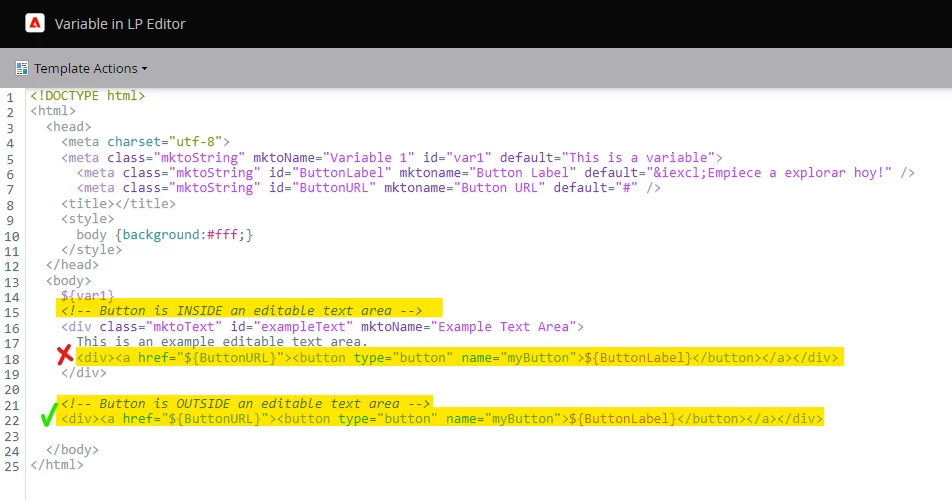
(above) There are two buttons here (same button) -- one is included inside an editable area, the other is outside the editable area

 

(above) The highlight parts are inside an editable area (and do not work) and the bottom button is outside the editable area (and does work).


Is there a chance that you're using the variables inside an editable area on the template?

If so, I think that could cause the issue you're running into here. If that's the case, you really don't need the variable there b/c you can use the Rich Text Editor to go in and change the URL and Text of the button. If you use the <button> element, it'll be harder to edit the buttons using the RTE but if you use the <a> element, you can use the Insert/Edit Link tool on the RTE toolbar to easily edit the button text and link. I'd recommend using the <a> tag over the <button> tag in this situation.



2 replies

Dave_Roberts
New Participant
September 11, 2023


Here's a few additional suggestions:

  • You do not need the mktoModuleScope attribute on your variable - that's an email thing. 
  • You might want to choose to use an anchor tag OR a button tag for your button rather than nesting a button inside of an anchor tag. I'd recommend going with the <a> tag (b/c it's editable in using the Rich Text Editor) and adding a class to it for styling... something more like:
    HTML
    <div><a href="${ButtonURL}" class="button">${ButtonLabel}</a></div>​CSS
    /* default button state */ .button { padding: 5px 15px; background-color: transparent; color: #000; border: 1px solid #BBB; border-radius: 6px; } /* active button states (hover, active and focus) */ .button:hover, .button:active, .button:focus { background-color: #BBB; color: #fff; }


New Participant
September 12, 2023

Hey Dave,


Thank you for those suggestions! Ive tried using both an anchor tag and a button tag for the section but I am still seeing the same issue.


Dave_Roberts
Dave_RobertsAccepted solution
New Participant
September 12, 2023

Thanks for following up and giving the button switch a try. I've read thru some of the other suggestions here and would have thought that one of those should have solved the problem. 


I did some add'l testing this morning and setup a Guided LP template with some variables to match your situation. What I discovered is that when the variables are contained inside an editable text area that they don't work, but when they are not inside an editable area, they do work. 

Here's a few images for reference of the testing setup:

(above) There are two buttons here (same button) -- one is included inside an editable area, the other is outside the editable area


(above) The highlight parts are inside an editable area (and do not work) and the bottom button is outside the editable area (and does work).


Is there a chance that you're using the variables inside an editable area on the template?

If so, I think that could cause the issue you're running into here. If that's the case, you really don't need the variable there b/c you can use the Rich Text Editor to go in and change the URL and Text of the button. If you use the <button> element, it'll be harder to edit the buttons using the RTE but if you use the <a> element, you can use the Insert/Edit Link tool on the RTE toolbar to easily edit the button text and link. I'd recommend using the <a> tag over the <button> tag in this situation.



SanfordWhiteman
New Participant
September 6, 2023

What is that a screenshot of? A real email sent to someone?

New Participant
September 6, 2023

Hey Sanford,


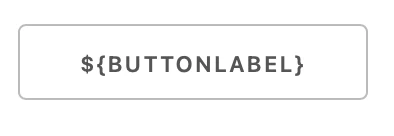
The screenshot is of the main CTA on the LP. The global variable in the LP editor with the default text is the other screenshot. The CTA is displaying the global variable code rather than the editable default text.

Jo_Pitts1
Community Manager
September 6, 2023

@rmoravick1 ,

${ButtonLabel} != ${BUTTONLABEL}

Try using the same case as your ID in the CTA

Cheers

Jo