Lead Merge Issue - Field "Created" Erased | Community
Skip to main content
Emmanuelle_Biss
New Participant
October 5, 2016
Solved

Lead Merge Issue - Field "Created" Erased

  • October 5, 2016
  • 2 replies
  • 5213 views

Hi!

To remove duplicates, I merge leads together. However, I just discovered that when I do so, the Created date is merged as well, and it usually keeps the newest lead created date, instead of keeping the oldest one (i.e. the first lead that came in).

How can I make sure that when two leads are merged, the Created date keeps the oldest one, instead of updating it to the newest version?

Thanks for your help!

Emma

This post is no longer active and is closed to new replies. Need help? Start a new post to ask your question.
Best answer by Grégoire_Miche2

It does not work, even if I specify to keep all data from the older version, it will merge and keep the most up to date data.

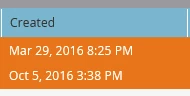
Example with these two leads:

I want to keep the data from the lead that was created on Mar 29, but when I merge the two together, it will modify the field Created with the Oct 5, 2016 date...

I tried by checking specific data, and by selecting all data (from the oldest lead) but it does not matter what I do, it will take the most recent date under the field Created.


Hi Emmanuelle,

I ran some tests.

In fact it seems that, whatever we do, Marketo keeps the highest leadID (the most recently created lead) and it's creation date, indeed.

Unfortunate we cannot really choose the one we want to keep.

Thanks for notifying the community

If you log an idea about this, I'll vote

-Greg

2 replies

Grégoire_Miche2
New Participant
October 5, 2016

Hi Emmanuelle,

My understanding is that it will keep the value of the wining record.

-Greg

Emmanuelle_Biss
New Participant
October 5, 2016

Hi Gégoire,

How can I define which one to choose over the other though? Because the winning one might not be the first lead to have come in through Marketo. It seems to keep the most up to date lead, which is not necessarily what I need for certain fields.

Thanks!

Grégoire_Miche2
New Participant
October 5, 2016

The wining one is the one that have the check box in the title bar checked. (in your screenshot lead 1).

The difficulty is that there is no way to know if you are checking the oldest one...

-Greg

Devraj_Grewal
New Participant
October 5, 2016

Emmanuelle,

When you merge and view the pop-up of all the conflicting fields, do you not see "Lead Creation Date" as an option?

Emmanuelle_Biss
New Participant
October 5, 2016

Hi @Devraj Grewal​,

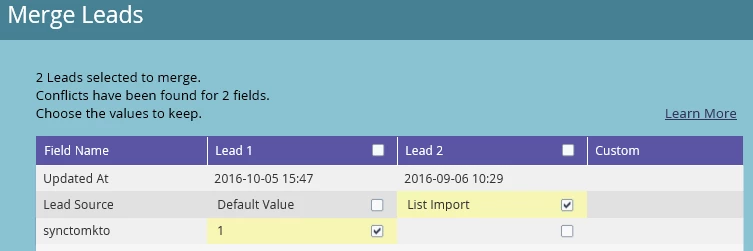
No, this is not an option. For exemple, here's what I have when I want to merge two leads together:

I only have three fields to choose from. But once they merge, it updates multiple more fields, including the Created field, choosing one over the other without my approval.

Devraj_Grewal
New Participant
October 5, 2016

For these two leads specifically, what are their created dates? Both Marketo created date and SFDC created date?