Lead Source keeps changing | Community
Skip to main content
Tara_Rowe
New Participant
May 25, 2017
Solved

Lead Source keeps changing

  • May 25, 2017
  • 3 replies
  • 3784 views

Hello -

We have a issue that keeps coming up. Lead Source. Currently we have a list which is used for original lead source which pulls into SFDC. We are finding that when the lead is converted to a opp the lead source is not carried over and changed by the Sales Rep. We want to add in original and most recent lead source into SFDC eventually however we do not have admin rights to do so. We are now finding that our lead source on the lead is over writing in some cases and cannot figure out why? Here is a example of a lead source that has changed. We assumed that it was only changing it if lead source was empty but it seems it is overwriting it all together?
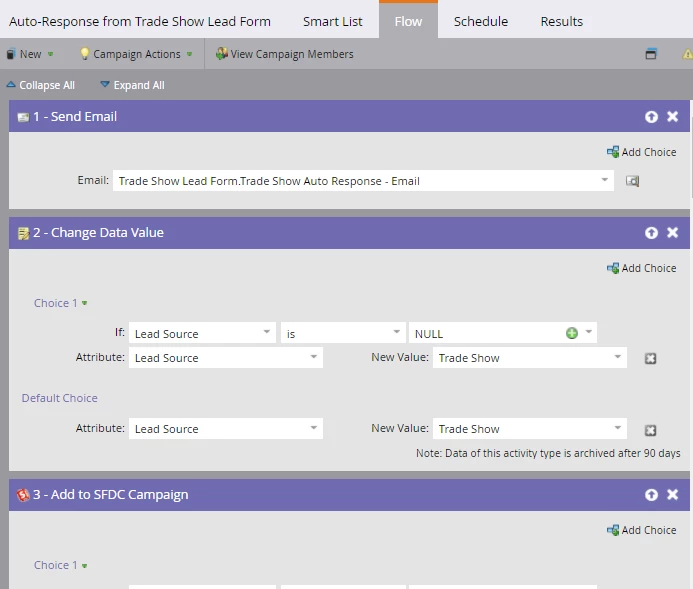
Any ideas how we can lock it down, through Marketo?
This post is no longer active and is closed to new replies. Need help? Start a new post to ask your question.
Best answer by Chris_Saporito

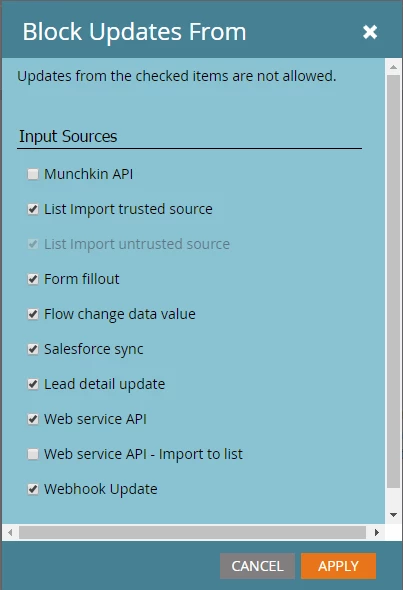
Hi Tara, by having the default choice set to add a new value of "Trade Show" no matter what this is going to change the Lead Source to "Trade Show". One thing that you can do is to clear out the default choice and it will do nothing. Another thing to keep in mind is that within the Admin tab you can manage how Lead Source is updated, you can block updates completely. Under Admin, select Field Management, search for the field (in this case Lead Source), then click the dropdown for Field Actions and finally Block Field Updates. Once there you can manage how a field is updated.

3 replies

ChristinaZuniga
New Participant
May 25, 2017

If you haven't already, I recommend setting up a smart campaign that will send you a notification when lead source changes. I was able to find the worst sales offenders changing my original lead source using this campaign and provide them training that convinced them to stop.

Tara_Rowe
Tara_RoweAuthor
New Participant
May 25, 2017

Love this, thank you!

This is super.

Darrell_Alfons2
New Participant
May 25, 2017

plus one for chris' points.

i just use "lead source is empty"

Chris_Saporito
Chris_SaporitoAccepted solution
New Participant
May 25, 2017

Hi Tara, by having the default choice set to add a new value of "Trade Show" no matter what this is going to change the Lead Source to "Trade Show". One thing that you can do is to clear out the default choice and it will do nothing. Another thing to keep in mind is that within the Admin tab you can manage how Lead Source is updated, you can block updates completely. Under Admin, select Field Management, search for the field (in this case Lead Source), then click the dropdown for Field Actions and finally Block Field Updates. Once there you can manage how a field is updated.

Tara_Rowe
Tara_RoweAuthor
New Participant
May 25, 2017

If we block updates would that mean if a lead source was updated in SFDC it would not change/update on our end only in SFDC correct?