
Lifecycle Processing: The Operational Spine of Marketo
The backbone of a marketing automation platform is a prospect’s progression from original visitation and creation into a system all the way through becoming an active customer—driving that flow is how a prospect is treated within the system both operationally (behind-the-scenes data cleanliness) and effectively (choosing nurture communications, targeting tracks, and sales tasks). Lifecycle Processing takes how you think of your revenue model (or lead conversion funnel) and turns that into a collection of marketing automation actions that can be used as hooks by other operational programs or marketing initiatives.
Let’s say you work for a revenue team at a major B2B company. When a lead comes to your site and raises her hand by filling out a form or accessing a particular offer, what happens next? What is your team going to do to push that lead through marketing and sales, toward an open opportunity? What does your marketing automation system actually do at that point, and how does it choose to do so? With Lifecycle Processing, the process of moving leads from one Lifecycle Status to another is completely automated, based on preconfigured triggers. Prospects should automatically sort to the right Lifecycle Status upon creation in the system, and then move down the funnel at the right times and in the right order from there. This describes the Etumos approach to Lifecycle Processing.
Defining Lifecycle Status
Lifecycle status is defined by the progression from lead to contact. For each lead that enters the system, your goal is either to progress that lead toward becoming a customer, or to determine that the lead is unlikely to become a customer, and remove them from the lifecycle. The statuses that we use in Lifecycle Processing are derived from the SiriusDecisions waterfall model and have been carefully adapted to measure and optimize our efforts:
- 0 – Processing: This status includes all new leads that you have not begun to qualify or define yet. It acts as a holding queue for operations that will happen to all new leads in the system, regardless of which stage they will fall into.
- 1 – Marketing Accepted Lead (MAL): These leads have been qualified based on demographic scoring—philosophically, they’re leads who you’re interested in as a company, as they’d be a good fit as a customer and would be able to pay for your product or services.
- 2 – Marketing Qualified Lead (MQL): These leads have been qualified based on behavioral scoring; philosophically, these are leads who are interested in your company, and are likely to have a positive conversation with Sales.
- 3 – Sales Accepted Lead (SAL): These are leads the sales team has contacted directly or will contact soon. With organizations that have XDRs (choose your favorite acronym: Business Development Reps, Sales Development Reps, Marketing Development Reps, Lead Development Reps), these usually denote original lead vetting by a human.
- 4 – Sales Qualified Lead (SQL): These are leads/contacts that the sales team has begun to push toward open opportunities, showing an opportunity with an estimated dollar amount and a closing timeframe.
- 5 – Customer: These are contacts that have been attached to closed-won opportunities.
- 9 – Disqualified: These are leads or contacts that have been removed from your lifecycle, due to the fact that they were not demographically and/or behaviorally qualified—they’ll never become customers, neither now nor ever.
After a prospect has been placed into one of these statuses after Original Processing, the leads are passed through further lifecycle statuses sequentially, moving further down the funnel but not up the funnel. Each time the Lifecycle Processing program detects a milestone lifecycle event,a new event occurs in the lifecycle, the appropriate status is triggered automatically. In order to conduct effective Lifecycle Processing, you’ll need to go through and establish the triggers that are used to initiate each Lifecycle Status. There are two ways that we think of the triggers that kick off a Lifecycle Status change—system-based triggers and process-based triggers. System-based triggers rely on system infrastructure, such as a score change hitting a threshold. Process-based triggers require a process to be in place by humans on your team, such as a Sales Rep changing a prospect’s Lead Status to “Disqualified” based on phone conversations. Once you have the defining triggers codified for each Lifecycle Status, you can organize marketing and sales efforts based on each Lifecycle Status milestone. For example, “once a lead becomes a Marketing Accepted Lead, which nurture program should she be placed in?” Or “once a prospect becomes a Marketing Qualified Lead, should we assign a task to Sales for follow-up and send an email alert to the owner?”
Running through Original Processing
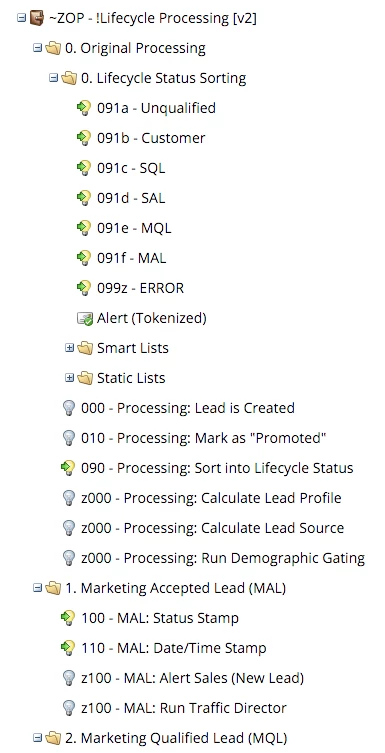
The first stage of processing happens before we know where a lead actually fits into our lifecycle. Remember that “lead is created” trigger that gets used (and abused) everywhere? All operational smart campaigns that happen based on that lead’s creation, regardless of what stage the lead fits into, can be consolidated into this collection of smart campaigns. This includes calculating the source of the lead and conducting demographic scoring. If you’re running controlled cohort tests as a part of your marketing process, here is where you’d assign those random cohorts. The final step of Original Processing is a tree-based decision of which Lifecycle Status this newly-identified prospect fits into. For example, if a prospect has a higher behavioral score than our threshold, it jumps past Marketing Accepted Lead and directly to Marketing Qualified Lead. If this is a new Contact that’s been identified late in the sales process (such as finally meeting the CEO of a company for final verification before a big purchase), it goes directly to Sales Qualified Lead.
Becoming a Marketing Accepted Lead
A Marketing Accepted Lead (MAL) is any lead that is determined to be valid, someone who can at some point become a customer. At this point, a lead has just become known and we have relatively little information on its behavior. MAL leads should also be added to nurture campaigns, in order to create opportunities for behavioral scoring.
Transitioning from Marketing Accepted Leads into Marketing Qualified Leads
A Marketing Qualified Lead (MQL) is the next step in Lifecycle Processing after MAL, defined as someone who is both demographically qualified (aka, you’re interested in them) and behaviorally qualified (aka, they’re interested in you). This status is triggered whenever a lead’s behavioral score crosses a certain threshold, or whenever a lead completes a hand-raise form that indicates they are ready to have a conversation with sales personnel. At this point, the next steps are to assign a sales owner to each individual lead, and try to initiate contact via that sales person.
Moving into Sales Accepted Leads
Sales Accepted Leads (SAL) have been prequalified already, and they’re now definitively owned by a salesperson. The goal here is to get human contact going with a lead who is a good use of a salesperson’s time—we like to think of this as a lead who is likely to have a positive conversation with a salesperson. If you have an inside sales team or XDRs (sales development representatives, marketing development representatives, lead development representatives, business development representatives, or your own favorite acronym), it becomes these persons’ jobs to initiate contact, establish human qualification, and move toward next steps of mapping your solution to your prospects’ problems. We usually identify Sales Accepted Leads as leads who have activity logged or change owners into known XDRs. The operational smart campaigns that follow do things like pausing from marketing nurture campaigns, assign follow-up tasks, add to an outbound remarketing campaign, and occasionally alert a team member that a lead has transitioned to SAL.
Opportunities create Sales Qualified Leads
Sales Qualified Leads (SQL) are, in almost all cases, identified as contacts who have become attached to an open Opportunity. Different organizations create Opportunities at different times depending on how the Sales team is structured, but the general rule is that when a close timeframe and estimated dollar amount have been established, an Opportunity is created. There are only two outcomes: Closed-Won or Closed-Lost. If a prospect has come this far, the prospect has been qualified many times over, and the results of this stage are directly measured into each salesperson’s close rate. Because this is an important moment, we like to mark SQLs as Marketing Suspended to make sure we err on the side of caution and not putting our foot in our mouth with an automated email.
Changing the way you operationally think
Lifecycle Processing is the backbone of how marketing automation runs, and it creates the measurement process for a data-driven marketing system. Having a fully organized Lifecycle Processing program quickly answers the question, “What happens in our marketing automation system operationally and regarding prospect communication?” It creates hooks for other operational smart campaigns, so you can very quickly try out new marketing initiatives without worrying about breaking a delicate order of operations. Importantly from an organization focused on increasing revenue from a scientific approach, Lifecycle Processing establishes measurable milestones and digests the revenue-creation process into a mathematical model that can be improved over time. Want more revenue? Increase the conversion rate from MAL to MQL. Is your SAL-to-SQL conversion rate lower than the industry standard? Increase that conversion rate for more revenue. Need to quickly pump the volume of leads for more revenue later? Feed the lead generation engine by creating a larger volume of Marketing Accepted Leads.
This article is a post from the Etumos blog series. More Marketo nerdery available there!