
Link to Corresponding SF Record **in Marketo** | Community
Skip to main content
Dave-Silva-2
New Participant
February 5, 2024
Solved

Link to Corresponding SF Record **in Marketo**

  • February 5, 2024
  • 2 replies
  • 2447 views

Hi,


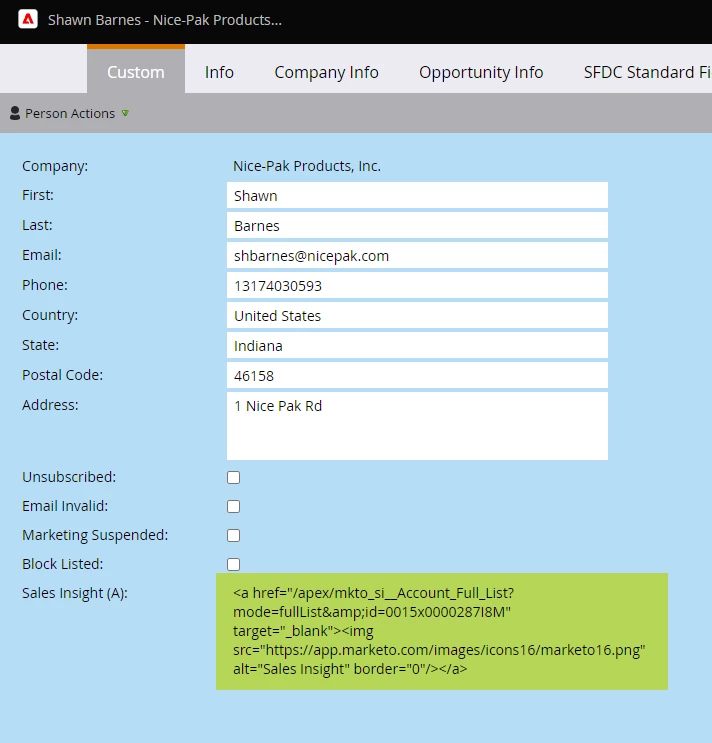
Does anyone have a solution to creating a direct link from Marketo to the corresponding lead/contact in SF on the Custom Person Layout so that we can easily navigate to it? I've included a screenshot of a hyperlink field, but it's not clickable.


Support claims there is no way to accomplish this but I'm blown away by this. With Pardot, it was easy to navigate back and forth from Pardot to SF and back with a single click.


Thanks,

This post is no longer active and is closed to new replies. Need help? Start a new post to ask your question.
Best answer by Michael_Florin-2

I think Marketo Support is right in the sense that you can't create something clickable in the Person Detail View. 


But as every person in Salesforce has an SFDC ID, you could created a custom field in Marketo called "Salesforce Link" and then populate that field in a Change Data Value Flow Step like this:


https://your-pod-id.my.salesforce.com/{{lead.SFDC ID}}


Then add that field to your view. You can't click it, but you can at least copy/paste it into your browser.

2 replies

SanfordWhiteman
New Participant
February 6, 2024

Field values are HTML-encoded in the Lead Detail UI, so you won’t be able to make an active <a> element.


You can create a bookmarklet if you want using the following simple JS (customize w/your Salesforce URL):


const mktoSfdcIdEl = document.querySelector("[name='Marketo SFDC Id']"); const mktoSfdcId = mktoSfdcIdEl.textContent; const link = document.createElement("a"); link.target = "_sfdc-via-marketo"; /* or "_blank" if you always want a new tab */ link.href = `https://your-pod-id.my.salesforce.com/?${mktoSfdcId}`; link.click();


Click the bookmarklet whenever you have a Lead Detail tab open:


Dave-Silva-2
New Participant
February 7, 2024

This is a great idea! Though, I can't get it to work for some reason.

Initially it worked, but I need to amend the URL and now it doesn't do anything when I click on it 🤔 🤔

I wonder if Edge is blocking the JS or something.


const mktoSfdcIdEl = document.querySelector("[name='Marketo SFDC Id']"); const mktoSfdcId = mktoSfdcIdEl.textContent; const link = document.createElement("a"); link.target = "_new"; link.href = `https://fiixsoftware.lightning.force.com/lightning/r/Lead/${mktoSfdcId}/view`; link.click();
SanfordWhiteman
New Participant
February 7, 2024

Works fine in Edge for me.  But I did have a typo in the comment above, I meant "_blank", not "_new" if you want a new tab each time. Delete your current bookmarklet, make that change, and try it again, please.

Michael_Florin-2
Michael_Florin-2Accepted solution
New Participant
February 5, 2024

I think Marketo Support is right in the sense that you can't create something clickable in the Person Detail View. 


But as every person in Salesforce has an SFDC ID, you could created a custom field in Marketo called "Salesforce Link" and then populate that field in a Change Data Value Flow Step like this:


https://your-pod-id.my.salesforce.com/{{lead.SFDC ID}}


Then add that field to your view. You can't click it, but you can at least copy/paste it into your browser.

Dave-Silva-2
New Participant
February 7, 2024

Thank you. I was hoping to avoid the copy and paste, but this can work.