Link tracking on web page not working | Community
Skip to main content
February 7, 2018
Solved

Link tracking on web page not working

  • February 7, 2018
  • 1 reply
  • 7297 views

We have a resource page set up with a munchkin code that contains links to PDFs. I set up a trigger campaign that is set up as follows:

Clicks link on Web Page

Link name: contains = (name of PDF, in the URL name when you hover the mouse over)

Web Page: is: (the webpage with a munchkin code - no query string)

Querystring: contains = (city name)

I know that you can't track PDFs, but can you track clicks that open PDFs?
This post is no longer active and is closed to new replies. Need help? Start a new post to ask your question.
Best answer by SanfordWhiteman

The place to start is a lead's Activity Log -- any Clicks Link activity that you're triggering on must be in the lead's ActLog, and that's how you double-check that your constraints are correct.

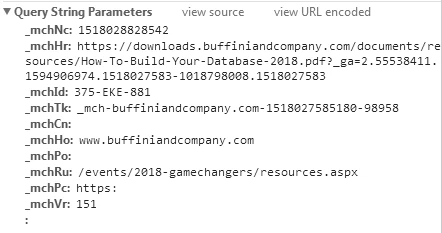
Testing your page, links to "Great Reasons to Call," "House Art Closing Gift," etc. are resulting in clickLink activities:

However, there are some significant errors in the setup:

  • You're loading Munchkin twice for 2 different Munchkin IDs. This will break. Instead, you use the altIds Munchkin init option.
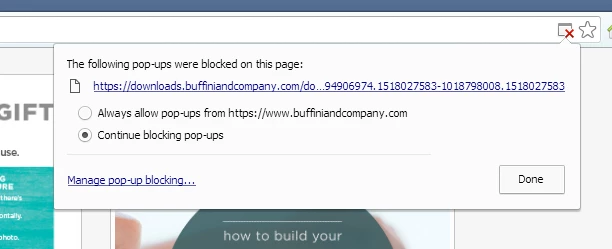
  • You're loading the PDFs as popups, which are blocked in (for one example) my Chrome:

1 reply

Dan_Stevens_
New Participant
February 7, 2018

Nick - has the web page/link to the PDF been recently deployed?  If so, you need to have at least one activity in Marketo so that it can report on it.  Did you make some test clicks on the page?

What specific value did you enter for "web page is"?  If you can include a screenshot of the smart list, it would be easier to diagnose.

February 7, 2018

Hi Dan,

Yes, the page was recently deployed and I tried testing clicking on the page after I activated the following trigger, but cannot see any click activity.

Link name contains: downloads.buffiniandcompany.com/documents/resources/Great-Reasons-To-Call.pdf

Web page is: www.buffiniandcompany.com/events/2018-gamechangers/resources.aspx - Gated page. Form fill outs are successfully being tracked with Web Page is: as a constraint.

I think the reason it isn't working is because I am trying to track a PDF, but wanted a second opinion.

If there is a way to do this, I am open for suggestions!

Dan_Stevens_
New Participant
February 7, 2018

Looks good from my perspective.  Typically when you use the "querystring" constraint, you need to include the entire string, e.g., "city=seattle".  But since you're using the "contains" evaluator, that shouldn't matter.

Just a quick bit of advice when using the "fills out form" trigger.  You're better off using the "referrer" constraint (using "contains" - and the base URL of the web page - since the referrer value evaluates the full URL, including any querystrings), instead of the "web page is" constraint - especially when the form is embedded on your website.  "Referrer", when used with the "fills out form" trigger/filter, refers to the page where the form was submitted and NOT the page that sent the user to this page.  We've just had better luck using this approach.